Knowledge that feels like a 1-minute interview intro
“What’s the difference between a process and a thread?”
Back in my job-hunting days, this question was always on the ‘Top 10 Classic Interview Questions’ list. I answered it like a robot.
“A process is a program in execution, and a thread is the unit of flow that runs inside a process. Processes don’t share resources, but threads do.”
The interviewer nodded, and I walked away convinced I had perfectly mastered the concept. But until I ran into a real ‘Concurrency Issue’ in production, I had no idea how truly terrifying that sentence was.
“Why is the view count supposed to go up by 100, but it only goes up by 98?” “Why does the whole website freeze when someone kicks off an Excel download?”
My code was flawless when I ran it alone, but it turned into chaos the moment multiple users hit it at the same time. I assumed the fix was just to add more ‘workers’, but I didn’t realize that as workers multiply, the cost of managing them (Context Switching) grows exponentially.

Factories and Workers in the Digital Fulfillment Center
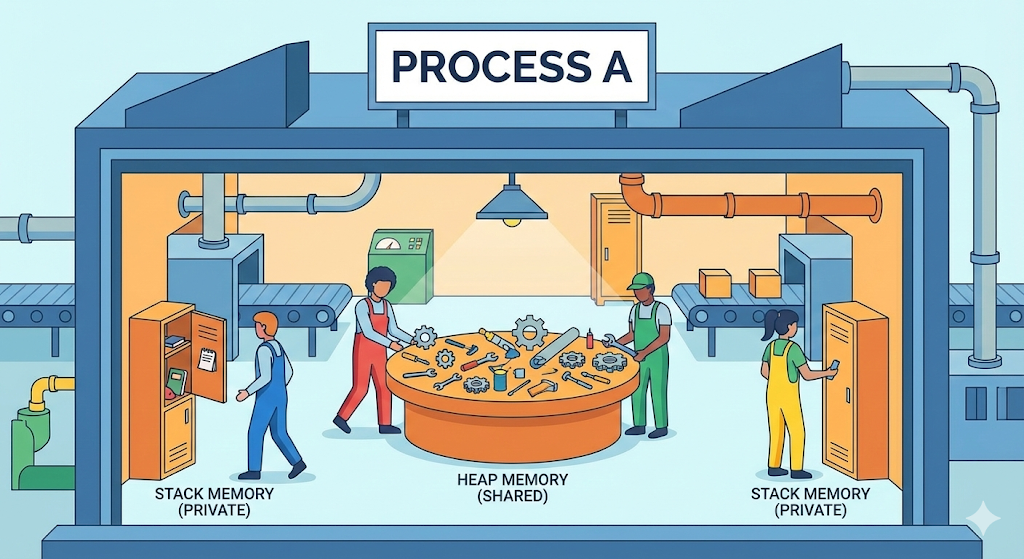
Let’s return to our ‘Digital Fulfillment Center’ mental model. Running a program inside a computer is just like setting up a ‘Factory’ inside the fulfillment center.
1. Process: An Independent Factory
- Definition: An ‘independent unit of work’ that is allocated resources by the operating system (the factory manager).
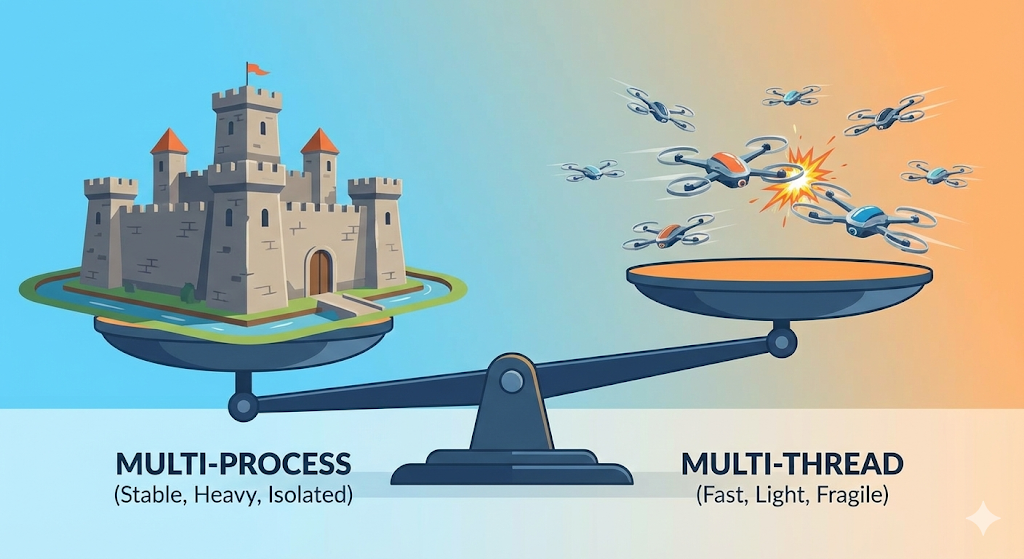
- Characteristics: Each one has its own building. Even if the factory next door collapses (an error), my factory stays safe.
- Cost: Building a factory takes land (memory) and a business registration (PID). It’s ‘expensive and heavy.’
- Sharing: As a rule, you can’t take things from the factory next door. (You have to use a complicated form of communication called IPC.)
2. Thread: The Workers Inside the Factory
- Definition: The ‘worker’ who actually does the work inside a process (the workplace).
- Characteristics: A single factory can have multiple workers (multi-threading).
- Cost: Hiring a new worker is far ‘cheaper and lighter’ than building a new factory.
- Sharing: This is the key point. The workers share the ‘cafeteria (Heap) and break room (Data).’
[Code Verification] The Tragedy of Sharing (Concurrency Problem)
“Threads share resources.” In the interview room that sounded like an advantage, but in production it can be the seed of disaster.
Remember the ‘Heap’ we learned about last time? Threads share that heap region. In other words, thread B can waltz in and overwrite the data that thread A is working on.
This is called a ‘Race Condition’. Let’s verify it with some code.
public class RaceConditionTest {
    static int count = 0; // Shared variable stored in the Heap

    public static void main(String[] args) throws InterruptedException {
        // Hire two workers (threads)
        Thread t1 = new Thread(() -> {
            for (int i = 0; i < 10000; i++) count++;
        });

        Thread t2 = new Thread(() -> {
            for (int i = 0; i < 10000; i++) count++;
        });

        t1.start(); // Start working!
        t2.start(); // Start working!

        t1.join(); // Wait until they finish work
        t2.join(); // Wait until they finish work

        System.out.println("Final result: " + count);
    }
}
Expected result: Two people each added 10,000 times, so the output should be 20,000.
Actual result: 15,482, 18,931… The value differs every run, and 20,000 never shows up.
Why:
- Thread A reads
count(100)from the heap and brings it into its stack. - Meanwhile, thread B also reads
count(100)from the heap. - A turns it into 101 and saves it to the heap.
- B also turns it into 101 (since the value it read was 100) and saves it to the heap.
- The value was incremented twice, but the result looks as if it was incremented only once.
This is the true identity of those production bugs where “data just gets eaten every now and then.” It’s the tragedy born from workers touching the same ledger without ever talking to one another.
Comparing this to a database (DB), it’s identical to ‘multiple queries flying at the same time without a transaction’. If you let account balances be modified simultaneously without a protective lock, you get the nightmare scenario where money just evaporates. Just as we protect data in the DB with ROLLBACK or COMMIT, at the code level we absolutely need a locking mechanism like Synchronized.
Real-World Trade-off: Multi-Process vs Multi-Thread
So in practice, when should you use which?
1. Chrome’s Choice: Multi-Process
In the old days of Internet Explorer, if one tab froze, the entire browser would crash (multi-thread approach). Chrome, on the other hand, spins up each tab as its own ‘separate process (factory)’.
- Pros: Even if one tab freezes (a factory blows up), the other tabs (the neighboring factories) are fine. (Stability)
- Cons: It eats up an enormous amount of memory. That’s why Chrome became such a notorious ‘RAM hog.’ (Cost)
2. Web Servers’ Choice (Spring, Node.js, etc.): Multi-Thread
A server has to handle thousands of requests. If you built a new process (factory) for every request, the server would blow up. That’s why we keep a single process and put a ton of threads (workers) inside it to handle the load.
- Pros: It uses fewer resources and runs fast. (Efficiency)
- Cons: If one thread throws an error and kills the process, the entire server goes down. On top of that, the developer has to guard against the concurrency issues we saw earlier on their own (Synchronized).
Wrap-up: Shadow Clones Come with Responsibility
Today we took a look at how workers actually work — ‘Processes and Threads’.
- Process: A safe but expensive independent workplace.
- Thread: A light, fast co-worker that comes with a risk of collisions.
You should now understand that the phrase ‘concurrency issue’ isn’t just an interview buzzword. Inside the shared warehouse called the Heap, countless thread workers are rushing in and out nonstop. Bringing order to that chaos is exactly what separates a skilled backend developer from the rest.
But wait — if there are tons of workers, how do we decide whose job gets done first? How does the factory manager (OS) juggle hundreds of workers? Next time we’ll dig into the manager’s most headache-inducing responsibility: ‘Scheduling and Context Switching’.