“Wait, why can I see the password?”
In my early days at the company, I was scrambling back and forth between frontend and backend work. One day, I was wiring the ‘member list API’ built by a colleague who had joined around the same time into the frontend screen.
I opened the Network tab in Chrome DevTools (F12) to check whether the data was coming through correctly, and the moment I saw the response data, I doubted my own eyes.
[
  {
    "id": 1,
    "username": "tester",
    "password": "$2a$10$D...", // Encrypted password exposed
    "ssn": "900101-1...",      // National ID number exposed
    "createdAt": "2024-01-01"
  }
]
Startled, I asked my colleague, “Hey, why are the password and national ID number visible in this API response?”
He answered casually. “Oh, that? The screen only shows the name anyway. I was lazy, so I just returned the result of userRepository.findAll() as it is. Is that a problem?”
A chill ran down my spine. All he wanted was convenience, but in practice he had planted the seed of a serious security incident.
“Just because it isn’t on the screen doesn’t mean it’s safe!”
Anyone can open the browser network tab. What if a malicious attacker called this API?
- Personal data leak: Every member’s national ID number and phone number gets stolen.
- Account takeover: Even an encrypted password can become a clue for a brute force attack.
- Internal logic exposure: Fields like
createdAtandcreatedBycan reveal your DB structure or the pattern of admin IDs.
Sending an entity out as-is was no different from turning the master bedroom of our house into a wall of clear glass.

DTO: the ‘wrapping paper’ for data
An ‘Entity’ is a kind of raw material handled only inside the factory. It is covered with things you should never show customers, such as secrets like passwords, or internal management fields such as created date, updated date, and soft-delete flags.
A ‘DTO(Data Transfer Object)’, by contrast, is the finished product, carefully wrapped and ready to be delivered to the customer.
- Entity:
User(id, password, name, ssn, createdAt, createdBy…) -> for the factory - DTO:
UserResponse(id, name) -> for delivery
Returning an entity directly is like serving a customer a bloody slab of raw meat instead of a cooked steak. We absolutely need a ‘mapping’ step in between.
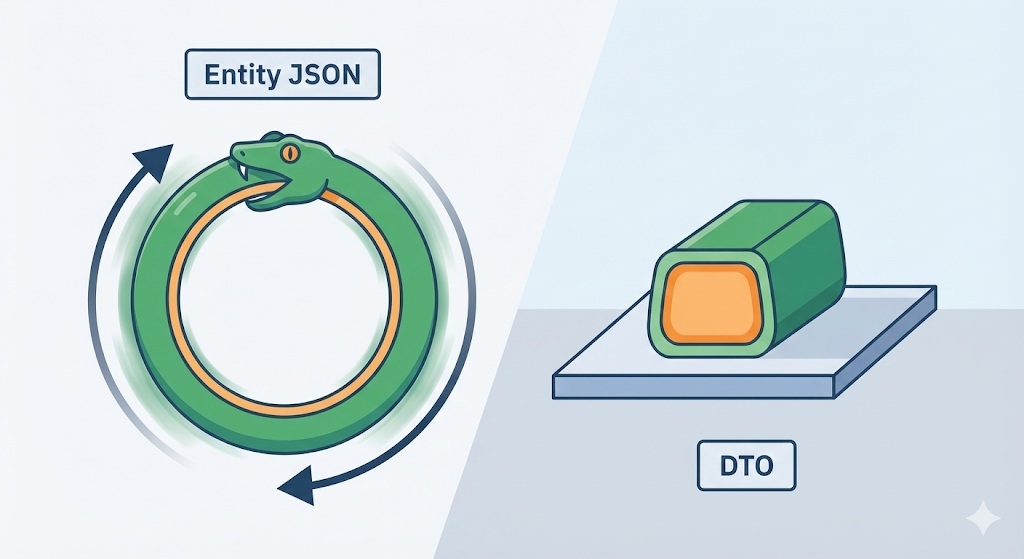
[Code Verification] The Swamp of Infinite Loops (Circular Reference)
What drives developers even crazier than security issues is the problem of ‘circular references.’ Do you remember the bidirectional JPA mapping we learned about last time, User <-> Team?
What happens if you return the User entity directly after converting it to JSON?
@Entity
public class User {
    @Id @GeneratedValue
    private Long id;
    private String name;

    @ManyToOne // A user belongs to a team
    private Team team;
}

@Entity
public class Team {
    @Id @GeneratedValue
    private Long id;
    private String name;

    @OneToMany(mappedBy = "team") // A team has many users
    private List<User> users = new ArrayList<>();
}
If you return User in this state, the JSON serializer (Jackson) works like this.
- Unwrap User. -> Oh, there’s a Team inside?
- Unwrap Team. -> Oh, there are Users inside?
- Unwrap the first User in the Users list. -> Oh, there’s a Team inside?
- Unwrap Team. -> Oh, there are Users inside?
- (Repeats forever…)
Result: the server dies a heroic death with a StackOverflowError. Relationships between entities chase each other endlessly, so if you expose them without cutting the chain, you fall straight into an infinite loop. That is the decisive reason to use a DTO and include only the fields you need, such as teamName.
What Makes a Good API: RESTful Design
Once the data is properly wrapped with a DTO, the next step is to choose the right ‘address’ to send that package to. That is what REST API design is about.
Back in college, I used to name URLs however I wanted.
- Sign up:
/joinUser - Update member:
/updateUser - Delete member:
/deleteUser
Putting verbs like join or update in the URL is not a good idea. In RESTful design, the ‘resource’ (noun) belongs in the URL, and the ‘action’ (verb) belongs in the HTTP method.
- POST
/users: Sign up (create it) - GET
/users/1: Get member 1 (fetch it) - PUT
/users/1: Update member 1 (replace it) - DELETE
/users/1: Delete member 1 (remove it)
When you structure things this way, you can tell just from the URL, “Ah, this is about user resources.” It also makes communication with frontend developers much easier. This is the shared convention developers use all over the world.
Practical Advice: Names Do Half the Work (DTO Naming Strategy)
Sometimes I open code in our current company project and sigh right away. UserDto, MemberVo, InfoParam, ResultData… the previous developers named things however they liked, so you cannot tell whether an object is for requests or responses until you dig through the code.
A DTO is a ‘container’ for data. If the purpose of that container is not reflected in the name, you end up with the kind of confusion where soup goes into a rice bowl and water goes into a soup bowl. The naming rule I recommend most in practice is this.
- State the role with a suffix
- Request:
Action+Domain+Request- Example:
JoinUserRequest,UpdateUserRequest
- Example:
- Response:
Domain+Response- Example:
UserResponse,UserListResponse
- Example:
- If you just call it
UserDto, you can’t tell whether it’s meant for sign-up or for lookups, so you end up opening the file every single time.
- Request:
- Group them with inner classes If you don’t want to end up with too many files, I strongly recommend the ‘inner class’ strategy. Create a single class called
UserDtoand gather the related DTOs inside it asstatic classes. Then your code readsUserDto.SignUpRequest, and it’s immediately clear where it belongs: “Ah, this is a user-related DTO.”
public class UserDto {
    // Sign-up request
    public static class SignUpRequest {
        private String email;
        private String password;
    }

    // User info response
    public static class Response {
        private String name;
        private String email;
    }
}
Wrapping Up Series 2: The House Has Been Built
With that, the [Monolith Builder] series comes to an end. We laid the foundation with Spring Boot (DI), separated frontend and backend (CORS), learned to work with databases through JPA, and even learned how to communicate through DTOs and REST APIs.
Now we have gained the ability to build a respectable web service on our own. But a developer’s journey does not end here. What is the point if the service I built only works on my own computer, on localhost? To show it to real users, it has to go onto a server.
But that server is not Windows. It is Linux, a black screen and nothing else. With no mouse at all, how do you install programs and run them there?
In the next series, [Works on My Machine], let’s step into the world of Linux and Docker to solve the eternal developer problem: “It works on my machine, but not on the server.”