“Install a Linux virtual machine and recreate the same environment.”
Three months after joining the company, the mood in the office was uneasy. The only senior developer on the team had already been reassigned to another project and was too busy packing up his own things to even think about handover, while the team lead had stepped away from hands-on development long ago and was far from current technical trends.
One day the team lead called me over. “When your senior leaves, you’ll be the only one left who can manage the servers. Even if the server goes down, you need to be able to recover it on your own. Install Linux as a virtual machine, VM, on your current development laptop, Windows, and recreate the exact same environment as the production server.”
That was the start of my suffering. I installed VMware, downloaded the Ubuntu ISO, and just getting it installed took half a day. I dug through the company wiki to install Java, Node.js, and PostgreSQL. I thought, “Newer must be better,” and installed Java 17, only to discover the legacy code still depended on Java 8, so it would not even build. I had to remove it and install everything again. Every time I changed a single line of code, I had to run mvn build, move the jar file into the VM, and run it there. It was pure pain.
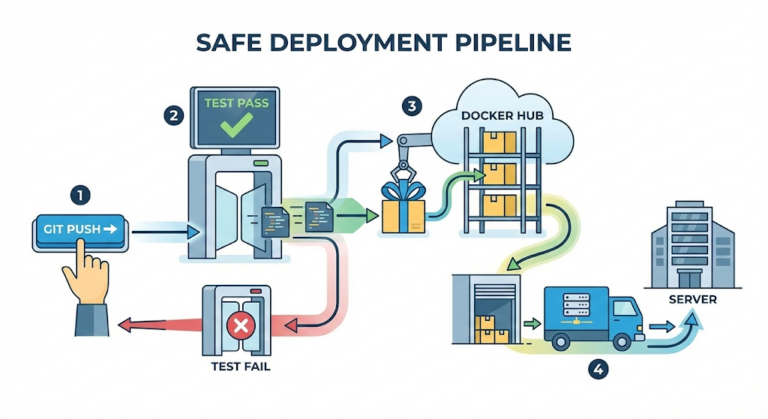
Then a question suddenly hit me. “Wait a second. The last time we deployed to production, didn’t it finish just by typing a single docker service update command?”
My local virtual machine was this heavy and needed a mountain of setup, so what exactly was that thing called Docker on the production server that let everything update with just one command?
The heavy solution: the virtual machine
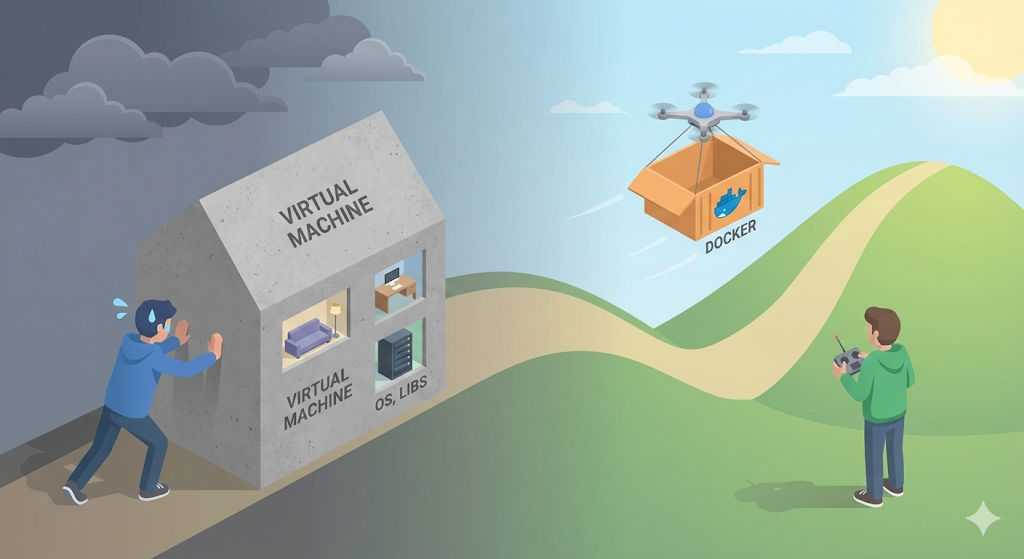
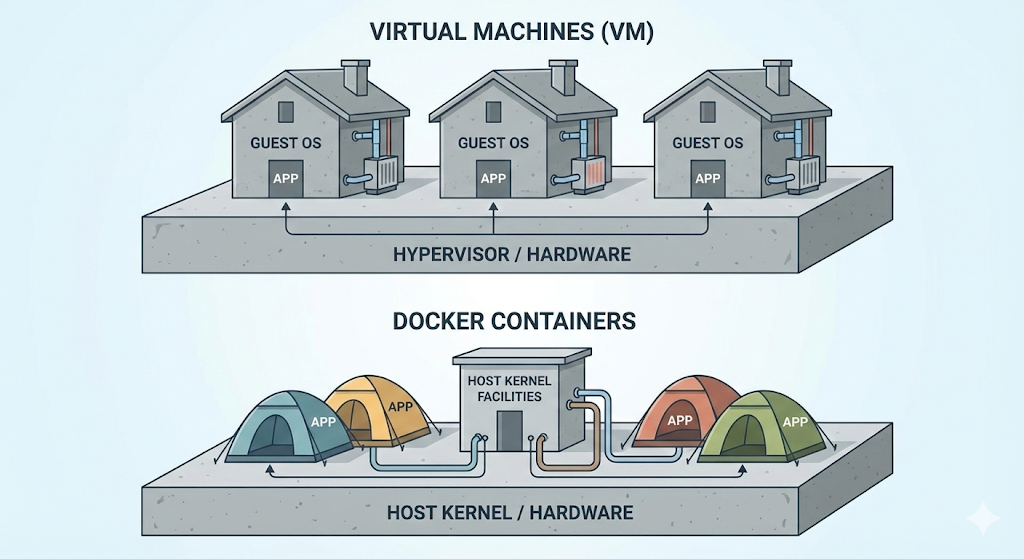
The method my team lead told me to use, installing Linux on top of Windows, is exactly what a virtual machine, VM, is. It is like building a whole ‘virtual house’, a guest OS, on top of a physical computer, the host.
- How it works: You run multiple OSes on a single computer. (Linux on top of Windows, then another Linux on top of that…)
- The problem: To build a house, you have to build everything from scratch, from the pillars and walls all the way to the bathroom (the kernel).
- You have to install an entire OS weighing several gigabytes just to run one app.
- Booting takes forever. (That is why my laptop got so slow.)
- It wastes resources. (Even when it is doing nothing, it eats up memory just to keep the OS running.)
In the end, a VM does isolate the environment reliably, but it is simply too heavy and too slow to keep passing around for development or deployment every single time.
The lightweight revolution: Docker
That is why Docker appeared, in other words, container technology. Docker does not build an entire house the way a VM does. Instead, it pitches a tent.
- How it works: It shares the yard (the kernel) of a house that is already built (the host OS, Linux). All it does is pitch an isolated tent (a container).
- Key traits:
- Shares the OS (kernel): There is no heavy OS inside the tent. It holds only my app and its libraries.
- Light: Its size is measured in megabytes (MB).
- Fast: Booting? There is no such thing. It starts up as quickly as launching a single process (in milliseconds).
The update command I ran on the production server was not reinstalling a heavy operating system. It was just “taking down the old tent and pitching a new one containing the new version of the code.” Of course that could only finish almost instantly.
[Code Verification] Is Docker really that light?
Let’s not just say Docker is light and leave it at that. Let’s check it for real. If the goal is to run a Linux, Ubuntu, environment, the difference between a VM and Docker is dramatic.
- Running Ubuntu in a VM: download the ISO file (2GB) -> install (20 minutes) -> boot (1 minute).
- Running Ubuntu with Docker:
# Run Ubuntu via the Docker CLI (downloads the image if missing)
$ docker run -it ubuntu:latest /bin/bash
Result:
- Download: about 30MB (a bare-bones image with only Ubuntu’s essentials)
- Launch time: about 0.5 seconds
The moment I hit Enter, I was already inside an Ubuntu environment. The reason this is possible is that a Docker container is not a real operating system. It is only “an isolated space that borrows the kernel of the host OS, my computer, while pretending to be a separate OS.”
Practical advice: the real reason to use Docker
Once we adopted Docker at work, my life changed completely.
- No more “Go set up your environment”: When a new hire joined, we used to hand them a ten-page document that said, “Install Java, set the environment variables, install the DB…” Now we just say, “Install Docker and type
docker-compose up.” - Escape from version hell: What if Project A needs Java 8 and Project B needs Java 17? Install both locally and they clash and get tangled up. With Docker, you can put Java 8 in container A and Java 17 in container B and run them at the same time without any problems, because each one is completely ‘isolated.’
In closing: we deliver not an executable, but an environment
The arrival of Docker changed the development paradigm. We no longer send only source code, .java, to the server. We freeze the operating system settings, libraries, and environment variables that the code needs into an ‘image’ and send the whole thing as one package.
Then how is this magical ‘Docker image’ actually made? Is it just a compressed file? Surprisingly, people say a Docker image is stacked in multiple layers, like a cake.
Next time, let’s dig into the secret behind Docker’s efficiency: images and their layered structure.