What does “One hamburger combo, please” actually mean?
Last time, we used a Dockerfile to create our own Docker image. That is like a recipe that never changes, one that says exactly how to place the patty on the bun and add the lettuce on top.
Now it is time to use that recipe to start the actual business, the service. But once you start using Docker, confusing terms begin to appear. Container, Service, Stack… they all sound similar, so what exactly is different about them?
If you do not get these concepts straight, you will later end up wandering around while writing deployment scripts, asking things like, “Why did I start the container, but the service still did not come up?” To sort out this family tree today, I brought the most universal language in the world: the hamburger shop analogy.
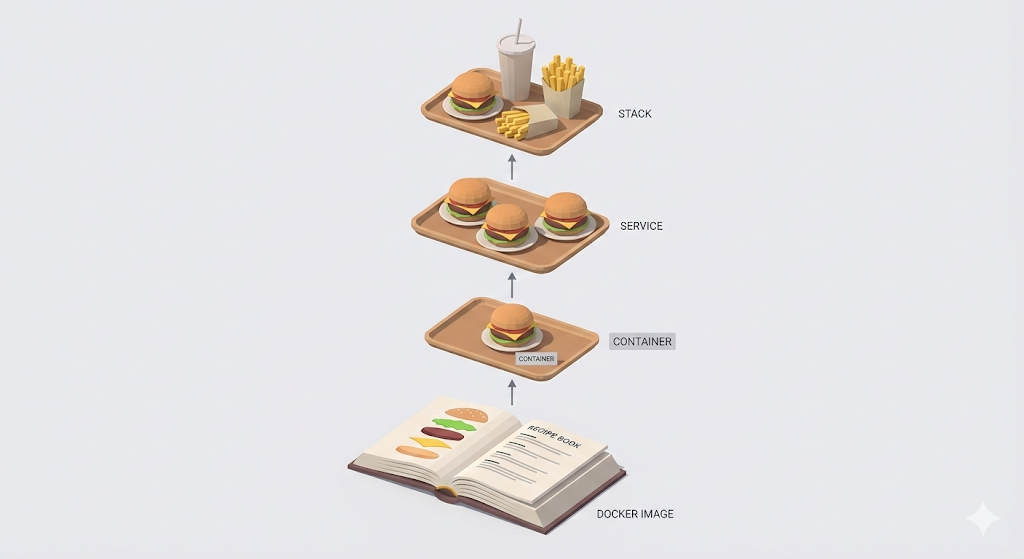
1. Container: a hamburger made for an order
- Definition: The ‘real thing’ you get when you run an image and load it into memory.
- Characteristics: You cannot hand the customer a sheet of paper with the recipe, the image. You have to serve a piping hot ‘hamburger,’ the container, cooked according to that recipe.
- Command:
docker run my-burger
If I launch one server instance, that means I have run ‘one container.’
2. Service: managing stock for the same menu item
Lunchtime comes, and customers flood in. One hamburger at a time is no longer enough to keep up. So we decide to increase the kitchen staff and keep three cheeseburgers prepared in advance. At that point, I am no longer managing just “one cheeseburger,” but the entire “cheeseburger line,” the service.
- Definition: A ‘group of containers’ made from the same image.
- Characteristics: You can give it a ‘policy’ such as “Always keep 3 of this menu item in stock (Replicas=3).” If a hamburger gets dropped (an error), it grills a new one on its own.
- Purpose: ‘Scale-out.’ Spreading out traffic and staying stable.
3. Stack: the combo meal, the full package
A hamburger alone is too dry. You also need fries, the DB, and cola, Redis. Only when all of those come together do you finally get a ‘complete meal,’ which is the application.
- Definition: The ‘top-level group’ that bundles different services together, such as the web server, the DB, and the cache.
- Characteristics: A hamburger and a cola are easier to eat when they sit on the same tray, the network connection. Once they are bundled into a stack, they get a dedicated space (Network) where they can talk to each other.
The problem: I am going to run out of breath just ordering all of this
The concepts make sense, but actually running all of this becomes a headache. A web service, a stack, usually needs components like the following.
- Spring Boot (Burger): 2 main menu items (redundancy)
- PostgreSQL (Fries): 1 side item
- Redis (Coke): 1 drink
Starting all of that with raw Docker commands, docker run, is like ordering at the counter like this.
“Excuse me, I’d like a cheeseburger, Spring, but please cook the patty medium-well, leave out the pickles, and add extra sauce. Oh, and give me fries, DB, but no salt, and three ketchup packets. Finally, for the cola, Redis, make it a zero cola with only half the usual ice. And please put all three items on one tray, Network.”
# In reality you have to type commands like these every time
$ docker run -d --name my-web -e PATTY=medium -e PICKLE=no -p 8080:8080 ...
$ docker run -d --name my-db -e SALT=no ...
$ docker run -d --name my-redis -e ICE=half ...
Could you recite that entire order without a typo every single time you deploy? What if the order sequence goes wrong and the fries come out later than the burger? The customer, the user, would not be happy.
The fixer: Docker Compose, “I’ll have the usual”
So developers came up with a better idea. “What if we just write this complicated order down on a menu document in advance, and then all we need to say is, ‘Give me combo number 1’?”
That is how Docker Compose was born. If you define your own custom combo meal inside a file called docker-compose.yml, Docker takes care of sending the orders to the kitchen and neatly placing everything on the tray in the right order.

[Action] Build your own combo meal
Let’s not stop at theory. Let’s actually bring up a Spring server and a DB from my local machine in one shot. All you have to do is create a docker-compose.yml file in the project root and paste in the content below.
version: '3.8'

services:
  # 1. Fries (DB)
  my-database:
    image: postgres:14
    environment:
      POSTGRES_PASSWORD: mysecretpassword
    ports:
      - "5432:5432"

  # 2. Cheeseburger (Web)
  my-web-server:
    image: my-spring-app:latest
    ports:
      - "8080:8080"
    depends_on:
      - my-database # "Fries must finish first before the burger goes out" (order guaranteed)
    environment:
      DB_URL: jdbc:postgresql://my-database:5432/mydb
Now say the magic words in the terminal.
# "One combo #1 (docker-compose.yml), please!"
$ docker-compose up -d
Result: Docker reads that menu file, starts the DB first, and then starts the Spring server once the DB is ready. This is exactly the beginning of the concept called IaC, Infrastructure as Code, managing infrastructure through code. From now on, even a complex server setup is solved by sharing just one menu file.
In closing: Works on My Machine? Works on ANY Machine!
The excuse that started this series, “But it works on my machine…,” no longer works. We understood Linux, the OS, isolated environments with Docker, the container, and defined complex services in a single file through Docker Compose.
Now, as long as I have the docker-compose.yml file I wrote, I can set up the exact same hamburger combo on my computer, on my team lead’s computer, or on an AWS server in just one minute.
We are no longer ‘just coders.’ We have become engineers who can design not only the code we write, but also the world, the environment, where that code will run. With that, the [Works on My Machine] series comes to an end.
From the next series on, let’s move into the world of [The Pipeline: CI/CD Automation], where we hand over the tedious deployment process to machines on top of this solid infrastructure.