Bug fix requests still come in, even on the day the company falls apart
Six months after joining the company, on the day the organization fell apart due to company circumstances and only our team was left standing on its own, the office was chaotic. My team lead told me, “I do not really know the technical side anymore, so you have to handle everything,” and handed me full authority over infrastructure management.
Even in the middle of that confusion, the phone kept ringing. It was a client. “Hello, the login page is throwing an error. Please fix it quickly.”
My mind went blank. In the old days, if I fixed it locally and just did a git push, Jenkins or GitLab on another department’s server would automatically deploy it to production. But that chain had been broken.
Now there was no “deployment robot” left to help me. I had to move this code to the production server with my own hands. It felt overwhelming. But at that moment, the things I had learned over the past few months by crashing into problems head-on flashed through my mind.
“Wait. Calm down. If I understand the principles, I can do it manually too. Let’s move it over safely, one step at a time.”
Git and GitLab: the repository for code
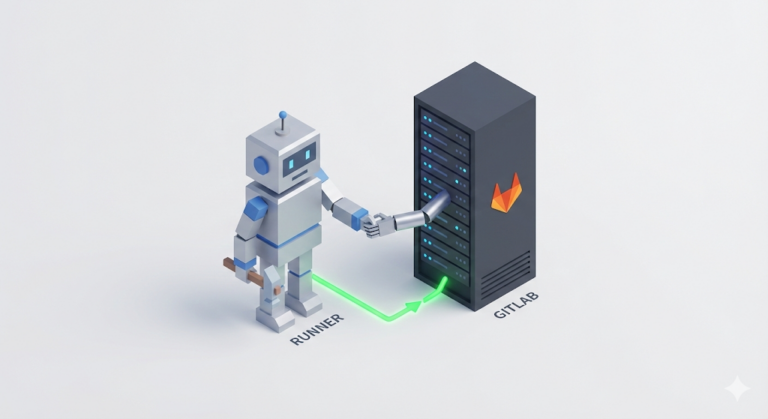
First, I had to rebuild the broken bridge. The first things I needed were “Git” and “GitLab.”
- Git: A tool that stores my code and manages its versions (history). (A time machine)
- GitLab: A platform that offers not only Git repository features but also deployment automation (CI/CD) tools, all combined into one.
“Do people not usually use GitHub more?” That is true. In the mainstream, GitHub (with GitHub Actions) is used the most, and some teams build and use Jenkins separately as the traditional powerhouse.
But we were in a closed internal network environment with restricted outside access, so GitLab Self-Hosted, which we could install directly on our own server, was the best choice. The tools may differ, but the essence is the same everywhere: store code and deploy it automatically.
I stayed up all night installing GitLab on the server and moving the code over.
“Phew, now if I push again, it should deploy, right?”
Excited, I modified the code and fired off git push origin master. The code went up to the GitLab repository just fine. But the production server did not budge. No matter how long I waited, the feature never updated.
Struggling through manual deployment: tracing the missing steps
“Huh? Why is it not deploying?” There was no senior to ask, no team lead to rely on. I had to find the answer myself.
The more I thought about it, the stranger it seemed. GitLab is just a “library that stores code.” Just because a new book arrives at a library does not mean it magically appears on the shelf of a bookstore, that is, the production server. In the past, something in the middle had been handling that delivery.
“Then do I have to deliver it myself?”
I started walking through the manual deployment process step by step. It was far more complicated and tedious than I expected.
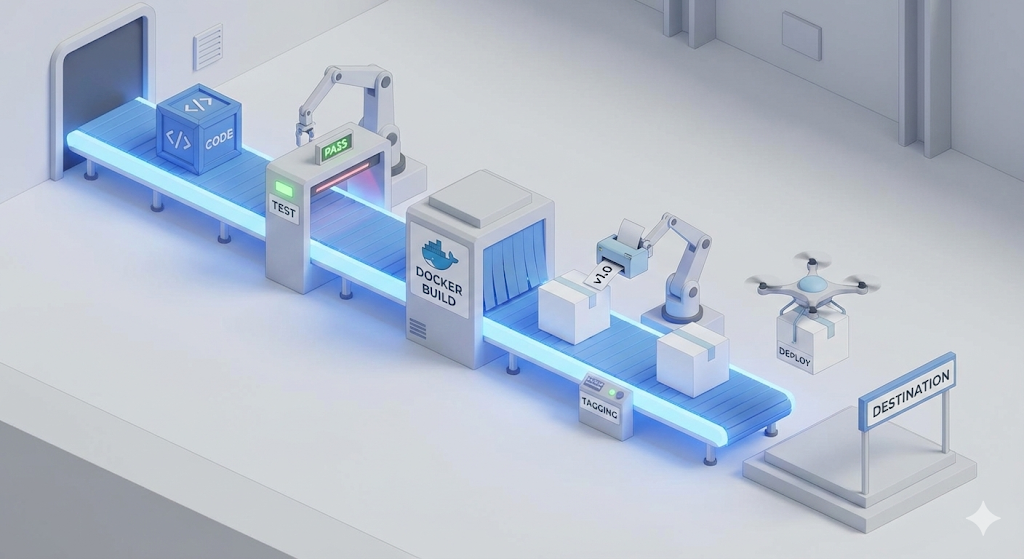
Step 1: Test & Build – filtering out defective products
The very first thing I had to do was verify that the Java code on my computer was valid and turn it into something runnable. Copying files was not enough. I had to check whether the code I changed had broken existing logic (test) and whether there were any syntax errors (build).
I opened the terminal and typed the command: ./gradlew test clean build
A message appeared with green check marks saying all tests had passed. Good. What if an error had appeared here? Then it would have been a “defective product.” Code like that should never go onto the server. This step was the “first safety device,” checking whether the code met the minimum qualifications.
Step 2: Dockerize – preserving the environment in amber
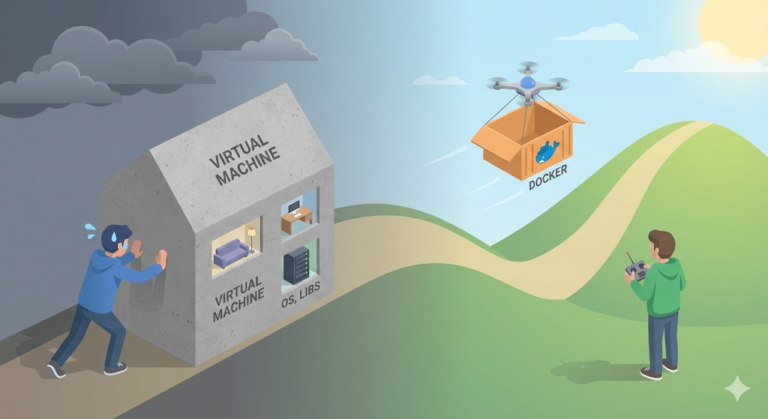
Now I had to send this jar file to the server. Could I just send the file by itself? No. The “Works on My Machine” series had drilled that lesson into me. My computer, Java 17, and the server, Java 8, might have different environments. So we decided to “freeze the entire environment” and send it that way. That is exactly what Docker is for.
I created a Dockerfile in the project root and wrote it out like second nature.
FROM openjdk:17-alpine
COPY build/libs/my-app.jar app.jar
ENTRYPOINT ["java", "-jar", "app.jar"]
Then I baked the image. docker build -t my-app:v1 .
Now my code had become an immortal “container image” that would run the same way no matter which server it was thrown onto. Docker was the “second safety device,” preventing errors caused by environment differences.
Step 3: Push & Pull – using a shared warehouse
The image was ready. Now I had to move it to the production server. Fortunately, Docker Hub was not an internal company server but an external internet service, SaaS. When the company fell apart, the GitLab link inside the internal network was cut off, but the path to the outside network was still open.
With trembling hands, I launched the image up to Docker Hub, the shared logistics warehouse.
- Upload from my computer:
docker push my-id/my-app:v1
After a short while, a message appeared saying the upload was complete. Now it was time to connect to the other side, the production server. Not by running into the server room, but by securely connecting remotely through “SSH (Secure Shell).”
ssh user@production-server
On the black screen I had connected to, the CLI, I pulled down the image I had uploaded earlier. docker pull my-id/my-app:v1
Step 4: Run – swapping it out
Finally, the last step. The old version of the server was already running. I had to stop it and bring up the new version. Linux commands flowed from my fingertips.
- Stop and remove the existing container:
docker stop my-app && docker rm my-app - Run the new container:
docker run -d --name my-app -p 80:8080 my-id/my-app:v1
The moment I hit Enter, a long hash value appeared, and when I checked the logs with docker logs -f my-app, the familiar Spring logo came up. Then the client called back. “Oh? It works properly now. Thank you!”
But people make mistakes in the end
That first manual deployment was successful. I felt confident. “What is this? Doing it alone is manageable.” But that arrogance did not last long. In repeated manual work, human limits showed up quickly.
Crisis 1. A bug on a one-plank bridge (the absence of Git branches)
A few days later, I was modifying the “login feature” for Client A when I suddenly got a message from Client B saying a critical bug had exploded in the “payment feature” and needed to be fixed immediately.
I panicked. I was using Git, but because I told myself I was developing alone, I had been doing all work on a single master branch. The code was already a mess of mixed-in changes from working on the login feature.
“Wait, if I fix and deploy only the payment bug in this state, the unfinished login code will go up too, right?”
In the end, I had to use a primitive approach: back up the code I had been working on into temporary files and roll the code back with git reset. In the process, I even caused a disaster by accidentally losing some code.
Crisis 2. I have no teammates (the absence of test code)
After many twists and turns, I fixed the payment bug and deployed it. Just as I was about to breathe, another message came in: now “sign-up” was broken. It turned out that while fixing the payment logic, I had touched a shared user validation function.
“Ah… if someone had reviewed my code, a Code Review, I would not have made this kind of mistake.”
But I had no senior to review my code, no teammate either. I was alone. In fact, because I had built the sign-up feature in such a rush, I had not written unit tests for it. If I had taken the trouble to write test code back then, the machine would have turned on a red light when I broke sign-up by touching the payment logic.
Crisis 3. “The server is down!” (the absence of Docker tags)
A few days later, the finishing blow arrived. I hurriedly added a feature and deployed it, but the server crashed with a business logic error as soon as it came up. Skipping tests had come back to bite me.
The client started flooding me with calls. “Please roll it back to the previous version right now!” With shaking hands, I opened the server terminal. But there was no way to roll back.
Every time, because versioning felt like a hassle, I had been overwriting the image with nothing but my-app:latest. Since I never attached separate version tags such as v1 and v2, the stable image from the previous version was already gone. In the end, I had to leave the dead server behind, go back to local, fix the code again, and build everything from scratch. It took 10 minutes to build the image, move it to the production server, and restart the container, and I had to submit a written incident report explaining how the outage happened.
In closing: the name of this whole process was the pipeline
While writing that incident report in exchange for 10 hellish minutes of downtime, I looked back on everything I had been through over the past few days.
- Git Branch: The starting point for keeping code safely isolated and managed.
- Test & Code Review: The filter that keeps defective products from moving on to the next step.
- Build & Dockerize: The process of packaging code into a runnable environment.
- Docker Tag & Push: The process of recording and storing versions in case the worst happens.
- Deploy: The final step, running a safe image on the server.
Until then, I had only known these processes as fragmented bits of knowledge. Sometimes I skipped them because they were annoying. Sometimes I skipped them because I did not know better. But the incidents I experienced in real work proved that every single one of these steps was an essential safety device that could not be omitted.
And then I realized what the “automation” I had been searching for actually was. It was not just a machine that typed commands for me. It was the path that makes steps 1 through 5 flow smoothly like running water, without interruption and without human mistakes.
That was the CI/CD pipeline.
“Team lead, I get it now. What we need is a ‘pipeline’ where these safety devices run automatically.”
Next time, based on this blueprint, let’s actually build my own deployment robot, the CI/CD pipeline.