“I Saved It, but My Changes Disappeared”
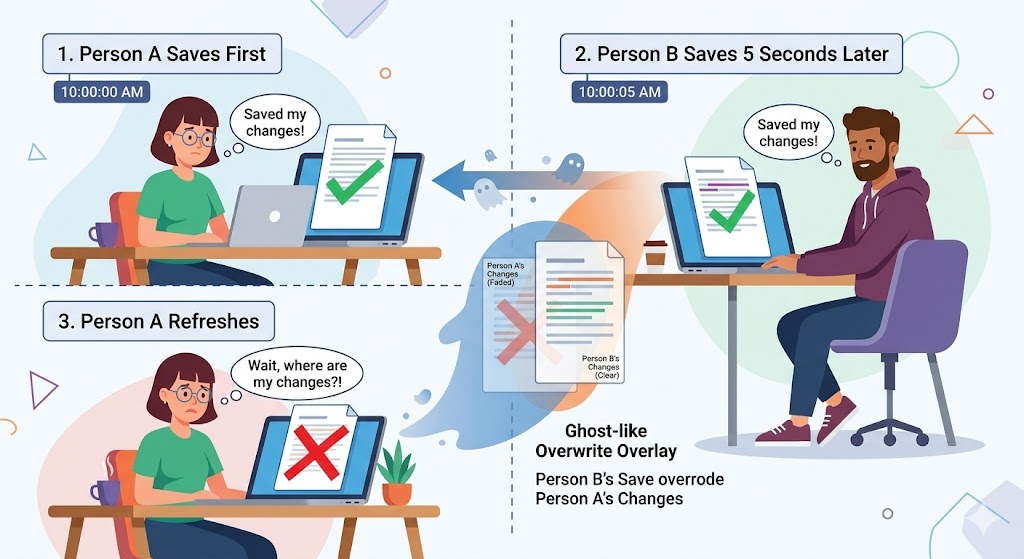
One day, I got a message from the staff member in charge.
“I edited the project info and saved it, but when I refreshed the page, it was back to how it was before.”
At first, I thought it was a bug. I looked at the code, but the logic was fine. It saved, and the change made it into the DB. But when I looked closely at the logs, the cause became clear.
[14:32:01] User A: views project "Farm Management" (version=1)
[14:32:03] User B: views project "Farm Management" (version=1)
[14:32:10] User A: renames it to "Smart Farm" → save succeeded
[14:32:15] User B: changes status to "Completed" → save succeeded
A changed the name, and 5 seconds later, B changed the status. Both got “save succeeded.” But when B saved, B overwrote A’s change. B saved the entire record as it was at version=1, so the name A had changed was lost.
This is the ‘Lost Update’ problem. When two users modify the same data at the same time, whoever saves later overwrites the changes of whoever saved first.
‘Doesn’t adding @Transactional fix this?’
It doesn’t. A transaction only guarantees ‘a single unit of work’; it doesn’t automatically take care of ‘two users editing at the same time.’ In this post, I’ll go over transaction basics first and then lay out, from a practical standpoint, how to control concurrency problems.
What Does @Transactional Actually Guarantee?
Before tackling concurrency, let’s briefly go over transaction basics.
A transaction bundles multiple DB operations into a single unit. “Either everything succeeds, or everything fails.” If one step fails partway through, everything is restored to how it was (a rollback).
@Transactional
public void transferMoney(Long fromId, Long toId, int amount) {
    Account from = accountRepository.findById(fromId).orElseThrow();
    Account to = accountRepository.findById(toId).orElseThrow();

    from.withdraw(amount);   // withdraw
    to.deposit(amount);      // deposit
    // Commit only if both succeed. If either fails, both roll back.
}
In Spring, a single @Transactional annotation manages the transaction. If every DB operation in this method succeeds, it commits; if even one throws an exception, it rolls back.
You’ve probably heard of ACID, the four properties of a transaction. In short:
| Property | Meaning | In one line |
|---|---|---|
| Atomicity | All or nothing | A withdrawal never goes through without its deposit |
| Consistency | Never breaks the rules | A balance can’t go negative |
| Isolation | Concurrent executions don’t interfere with each other | Two transactions don’t see each other’s intermediate states |
| Durability | Once committed, kept for good | The data survives even if the server goes down |
The key here is the third one, isolation. In theory, transactions should be perfectly isolated from one another, but in reality, the isolation level is dialed down for performance. And there are problems that isolation levels alone don’t solve. That’s where ‘concurrency control’ comes in.
Common @Transactional Mistakes
Before moving on to concurrency, let’s first go over the common mistakes with @Transactional itself. Knowing just these will save you a lot of time in practice.
Mistake 1: Calls Within the Same Class Don’t Get a Transaction
@Service
public class ProjectService {

    public void outerMethod() {
        innerMethod();  // @Transactional is not applied!
    }

    @Transactional
    public void innerMethod() {
        // DB work...
    }
}
Spring’s @Transactional is proxy-based. The transaction is applied only when the method is called from outside, through the proxy. Calling this.innerMethod() from within the same class bypasses the proxy, so no transaction is applied.
The fix: move the methods that need a transaction into a separate service class, or put @Transactional on outerMethod.
Mistake 2: Some Exception Types Don’t Trigger a Rollback
@Transactional
public void createProject(ProjectDto dto) {
    projectRepository.save(dto.toEntity());

    if (someCondition) {
        throw new IOException("File error");  // checked exception → no rollback!
    }
}
By default, Spring’s @Transactional rolls back only on RuntimeException (unchecked exceptions). It doesn’t roll back on checked exceptions like IOException. If you want a rollback on checked exceptions too, you have to say so explicitly.
@Transactional(rollbackFor = Exception.class)
Mistake 3: Read-Only Transactions
Adding readOnly to methods that only read data improves performance. Hibernate skips dirty checking, and the DB can apply read optimizations too.
@Transactional(readOnly = true)
public List<Project> getProjects() {
    return projectRepository.findAll();
}
The Concurrency Problem: Why Transactions Alone Aren’t Enough
Let’s revisit the Lost Update from the introduction.
Timeline:
1. Transaction A: reads project (name="Farm Management", status="In Progress")
2. Transaction B: reads project (name="Farm Management", status="In Progress")
3. Transaction A: renames it to "Smart Farm" → commit
4. Transaction B: changes status to "Completed" → commit
   → The name change from A is lost!
Both transactions committed normally. ACID’s atomicity wasn’t broken either. Yet in the end, A’s change disappeared. Why?
PostgreSQL’s default isolation level is ‘READ COMMITTED.’ At this level, the only guarantee is that “you can see only data that other transactions have committed.” It doesn’t stop two transactions from modifying the same data at the same time.
Raising the isolation level (REPEATABLE READ, SERIALIZABLE) can prevent some of these problems, but the performance cost is high and the risk of deadlocks goes up. So in practice, rather than raising the isolation level, we control concurrency with ‘locks.’
Optimistic Locking vs Pessimistic Locking
These are the core solutions to concurrency problems. Once you understand the difference between the two, you can judge which lock fits which situation in practice.
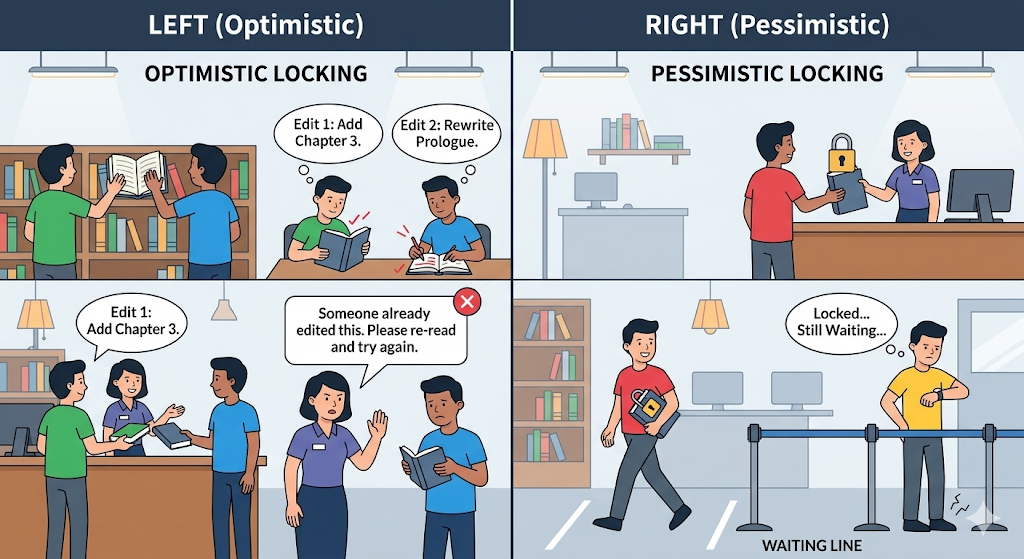
Optimistic Locking: “Conflicts Will Be Rare. Deal with Them When They Happen”
It assumes conflicts won’t happen often and detects them at save time. In JPA, you implement it with the @Version annotation.
@Entity
public class Project {
    @Id @GeneratedValue
    private Long id;
    private String name;
    private String status;

    @Version  // the heart of optimistic locking
    private Long version;
}
Once you add @Version, JPA automatically checks the version on every UPDATE.
-- SQL generated by JPA
UPDATE project
SET name = 'Smart Farm', version = 2
WHERE id = 1 AND version = 1
If another transaction has already bumped version to 2, the WHERE condition doesn’t match and the number of updated rows is 0. JPA detects this and throws an ‘OptimisticLockException.’
Timeline (with optimistic locking):
1. Transaction A: read (version=1)
2. Transaction B: read (version=1)
3. Transaction A: update → UPDATE ... WHERE version=1 → success (version=2)
4. Transaction B: update → UPDATE ... WHERE version=1 → fails! (version mismatch)
   → OptimisticLockException thrown
   → "Another user has modified this. Please try again."
// Exception handling example
@PutMapping("/api/projects/{id}")
public ResponseEntity<?> updateProject(@PathVariable Long id,
                                        @RequestBody ProjectUpdateDto dto) {
    try {
        projectService.update(id, dto);
        return ResponseEntity.ok().build();
    } catch (OptimisticLockException e) {
        return ResponseEntity.status(HttpStatus.CONFLICT)
            .body("Another user has already modified this. Please refresh and try again.");
    }
}
Pessimistic Locking: “There Will Be Conflicts. Lock It in Advance”
If you expect conflicts to happen often, you lock the row from the moment you read it. Other transactions wait until the lock is released.
public interface ProjectRepository extends JpaRepository<Project, Long> {

    @Lock(LockModeType.PESSIMISTIC_WRITE)
    @Query("SELECT p FROM Project p WHERE p.id = :id")
    Optional<Project> findByIdForUpdate(@Param("id") Long id);
}
-- SQL that actually runs (PostgreSQL)
SELECT * FROM project WHERE id = 1 FOR UPDATE
With FOR UPDATE, other transactions can’t modify that row until this transaction commits or rolls back. They wait, then proceed once the lock is released.
Timeline (with pessimistic locking):
1. Transaction A: SELECT ... FOR UPDATE → row locked
2. Transaction B: SELECT ... FOR UPDATE → waits (until A finishes)
3. Transaction A: update → commit → lock released
4. Transaction B: now proceeds → updates based on the latest data → commit
Which Lock Should You Use?
| Situation | Recommended | Why |
|---|---|---|
| Conflicts are rare (typical CRUD) | Optimistic locking | Good performance, no waiting |
| Conflicts are frequent (inventory, points) | Pessimistic locking | Guaranteed concurrency control |
| Lots of reads, few writes | Optimistic locking | Most operations go through without conflicts |
| Accuracy is a must, as in finance/payments | Pessimistic locking | Data integrity comes first |
Practical Advice
1. Watch Out for Deadlocks
The scariest thing about pessimistic locking is deadlock: a state where two transactions each wait for the other’s lock and stall forever.
Transaction A: locks project 1 → waits for the lock on project 2
Transaction B: locks project 2 → waits for the lock on project 1
→ both wait forever (deadlock!)
PostgreSQL detects deadlocks automatically and forcibly rolls back one side. But prevention is better.
- Always acquire locks in the same order (for example, always lock in ascending ID order)
- Keep transactions as short as possible
- Set a timeout on pessimistic locks
@Lock(LockModeType.PESSIMISTIC_WRITE)
@QueryHints(@QueryHint(name = "jakarta.persistence.lock.timeout", value = "3000"))  // give up after waiting 3 seconds
@Query("SELECT p FROM Project p WHERE p.id = :id")
Optional<Project> findByIdForUpdate(@Param("id") Long id);
2. A Retry Strategy for Optimistic Locking
When optimistic locking throws an OptimisticLockException, retrying automatically is sometimes better than simply showing an error.
@Retryable(value = OptimisticLockException.class, maxAttempts = 3)
@Transactional
public void updateWithRetry(Long id, ProjectUpdateDto dto) {
    Project project = projectRepository.findById(id).orElseThrow();
    project.update(dto);
}
That said, automatic retry isn’t right for every situation. When the change includes content the user edited by hand, “notify about the conflict + prompt a refresh” is safer than retrying automatically.
3. Practical Checklist
| Item to check | Notes |
|---|---|
| Is @Transactional invoked through the proxy? | Watch out for self-invocation |
| Do you need a rollback on checked exceptions? | Check the rollbackFor setting |
| Did you add readOnly=true to read-only methods? | Performance optimization |
| Do entities that can be edited concurrently have @Version? | Prevents Lost Updates |
| When using pessimistic locks, is the lock order consistent? | Prevents deadlocks |
| Is a timeout set on pessimistic locks? | Prevents waiting forever |
Wrapping Up: “Transactions” Alone Aren’t Enough
To sum up:
- @Transactional guarantees ‘a single unit of work’; it doesn’t prevent ‘concurrent edits.’
- Concurrent edit problems (Lost Update) are solved with locks.
- If conflicts are rare, use optimistic locking (@Version); if they’re frequent, use pessimistic locking (FOR UPDATE).
- When you use pessimistic locking, always account for deadlocks and timeouts.
In the next post, I’ll talk about API documentation. Opening up the code to explain every time a teammate asks “What’s this API parameter?” only goes so far. We’ll look at why I moved from Swagger to SpringDoc and how to generate API docs automatically.