What Does AI Say to “What’s the Weather in Seoul Today?”
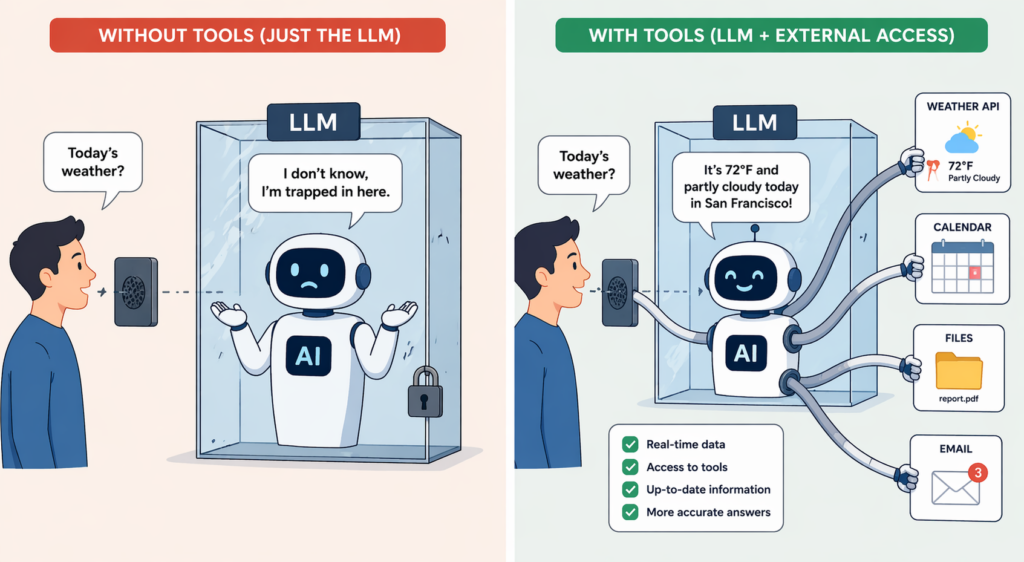
Around 2023, if you asked ChatGPT “What’s the weather in Seoul today?”, you got an answer like this.
“I’m sorry, but I don’t have access to real-time information, so I can’t tell you today’s weather. Please check the Korea Meteorological Administration or a weather app.”
Fair enough. A model is ‘frozen knowledge’ trained on past data, and it isn’t connected to the live world.
These days it’s different. Ask ChatGPT the same question and it tells you the actual weather in Seoul. Upload a file to Claude and say “Summarize this PDF,” and it does. Cursor reads and edits my code directly.
How did the same AI, running on the same “next-token prediction” principle, learn to do all this? The answer: it gained ‘technology for connecting to the outside world.’
In this post, I’ll walk through the technologies that turn an LLM from a text generator into a ‘working agent.’ There are four key terms: function calling, tool use (tools), MCP, and A2A.
What an LLM Can’t Do on Its Own
‘TL;DR: A model only knows what it knew when training ended. Real-time information and your own data have to be connected separately.’
Split what an LLM can and can’t do on its own, and the picture gets clear.
| What an LLM can do on its own | What it can’t do |
|---|---|
| Answer general-knowledge questions up to its training cutoff | Today’s stock prices, weather, news |
| Summarize/translate/analyze text you give it | Check my email, look up my calendar |
| Write general code | Read/edit my project files |
| Explain math concepts | Actually perform complex calculations (multiplying huge numbers, etc.) |
Everything in the right column lives in the ‘outside world.’ To do any of it, an LLM needs a bridge. The technology that builds that bridge is the subject of this post.
Function Calling: Letting the AI Say “Do This for Me”
‘TL;DR: A way to make the AI, when it lacks some piece of information, ask instead: “Use this function to find out for me.”‘
The most fundamental technique is ‘function calling.’ The idea is simple. You give the AI a “list of tools it can use” up front, and when it needs one, the AI itself asks: “Use this tool to get me the answer.”
Let’s revisit the weather question. (What follows is pseudocode to explain the concept. The actual API message format differs by provider.)
[Step 1] The developer tells the AI which functions are available.
   "There is a getWeather(city, date) function. Give it a city and a date, and it returns the weather."

[Step 2] The user asks a question.
   User: "What is the weather in Seoul today?"

[Step 3] Instead of answering directly, the AI requests a function call.
   AI: "Please run getWeather('Seoul', '2026-04-17')."

[Step 4] The program actually runs that function and returns the result to the AI.
   Program → weather API → result: "Sunny, 18°C"
   Program: passes the result to the AI

[Step 5] The AI looks at the result and writes a natural answer.
   AI: "It is sunny and 18 degrees in Seoul today. A great day to be outdoors."
The key point is that the AI doesn’t run the function itself; it ‘asks for the function to be run.’ At least for ‘custom functions (tools you build yourself),’ the actual execution is done by your application.
Why do it this way? Safety and control. If the AI could call any API it liked, one mistake could spend money, wipe out data, or fire off an email. The standard setup is for the developer to restrict it (“you can only use these functions”) and to validate the AI’s request before executing it.
A note on where things run: the explanation above applies to ‘custom functions.’ The ‘built-in tools’ that providers offer, such as the web search, code execution, and file search provided by OpenAI/Anthropic/Gemini, run on the provider’s own server infrastructure. Only the results come back to your app. So “the AI doesn’t execute anything itself” holds only for custom functions.
Going Deeper: The Actual Wire Format Differs by Provider (for Developers)
All three major providers share the same loop: “the model emits a structured call → the app executes it → the result goes back to the model.” The message formats, however, differ.
| Provider | Function request | Function result |
|---|---|---|
| OpenAI Responses API | function_call output item | function_call_output |
| Anthropic | tool_use block | tool_result block |
| Gemini | functionCall part | functionResponse part |
Even the names differ. OpenAI and Gemini call it ‘Function Calling’; Anthropic calls it ‘Tool Use.’ The concept is the same, but at the code level you have to follow each SDK’s conventions.
Tools: Function Calling, Generalized
‘TL;DR: Nearly a synonym for function calling. Every external capability an AI can use is collectively called a “tool.”‘
When the concept first appeared, it was called ‘Function Calling,’ but these days the broader term ‘Tools’ is used. Why?
Because it started with calling a single function, and the capabilities kept growing from there.
| Stage | What it can do |
|---|---|
| Function calling | Call one specified function |
| Tool use | A built-in tool set: web search, code execution, file reading, image generation, and more |
| Tools + compound tasks | Combine multiple tools in sequence to complete a complex task |
For example, today’s ChatGPT decides on its own when to use a ‘web search tool’ or a ‘code execution tool’ while answering. If a user says “Calculate this,” it uses a Python code execution tool behind the scenes; if they say “Tell me the latest news,” it uses the web search tool. Even if the developer doesn’t define every function by hand, there’s a built-in tool set provided by the vendor.
MCP: A Standard Way to Connect Tools, Data, and Prompts
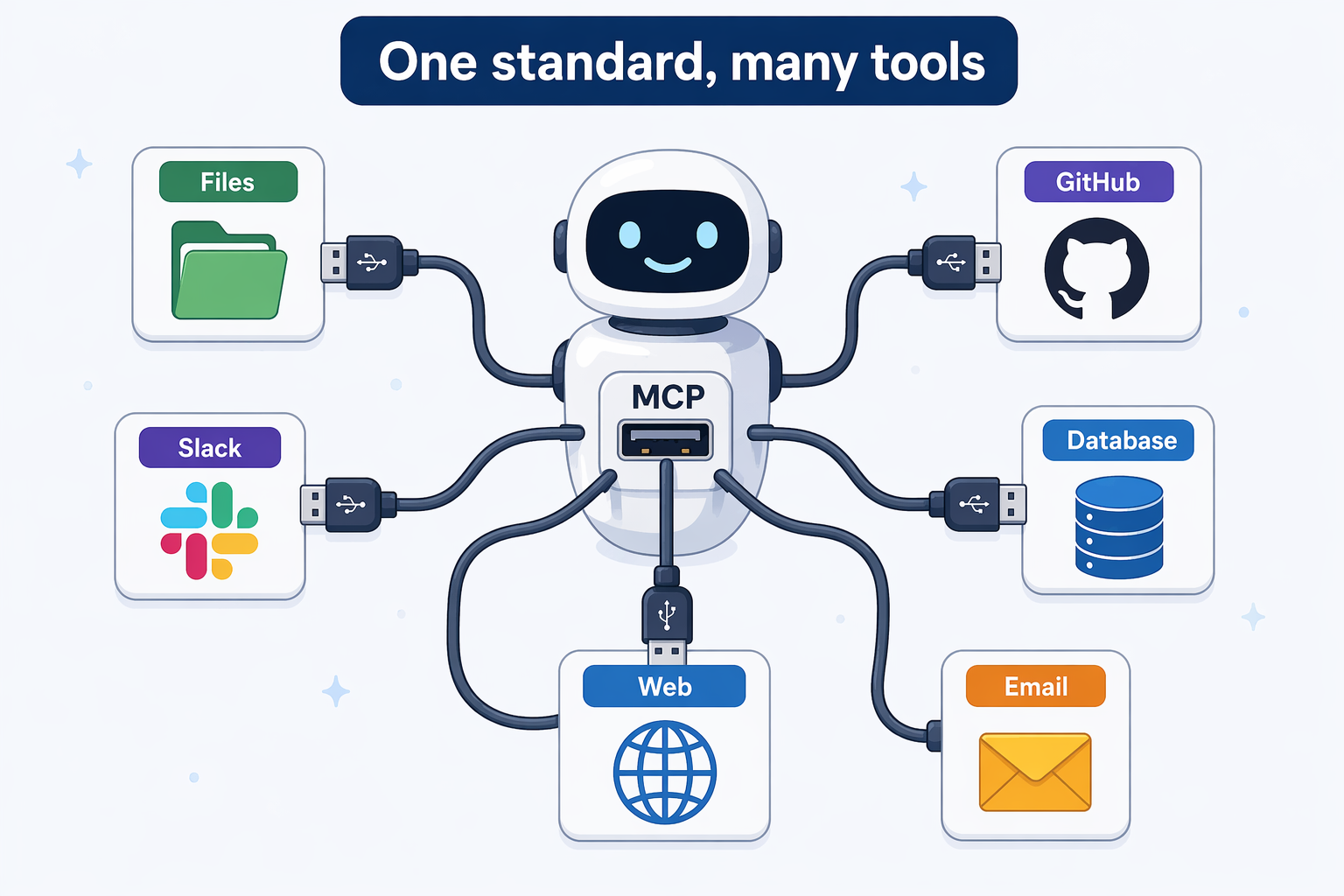
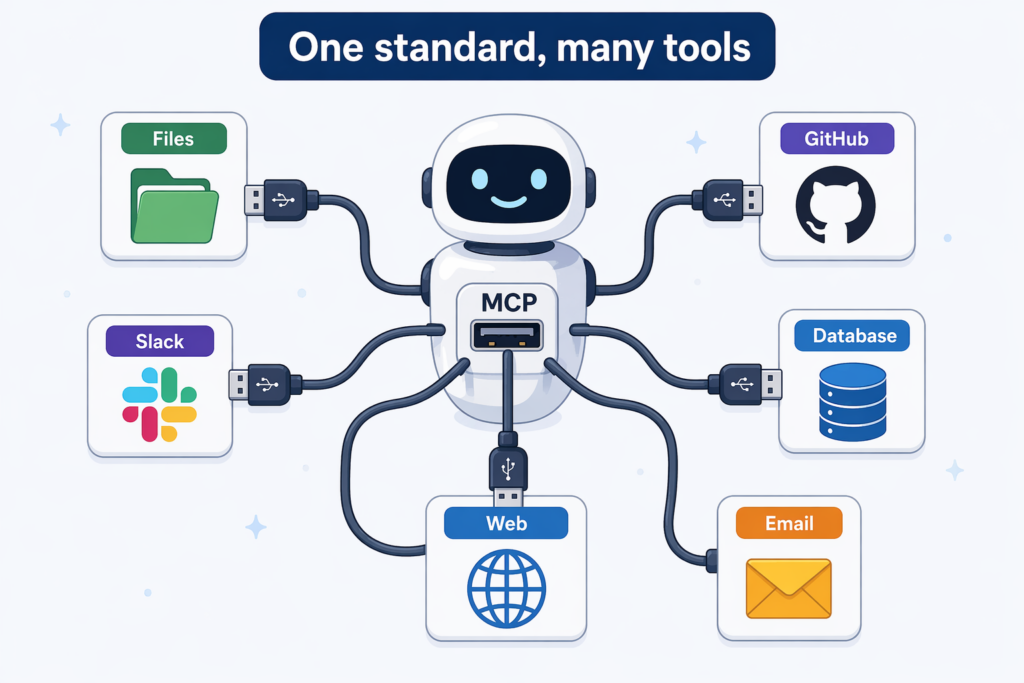
‘TL;DR: A standard, like a “USB spec,” for connecting AI to the outside world. Build it once, and multiple AI apps can use it the same way.’
As tool use became common, a new problem appeared. Every company had its own way of “connecting AI to external systems,” so you had to build one tool for OpenAI and a separate one for Claude.
To solve this, Anthropic released ‘MCP (Model Context Protocol)’ in November 2024. The name sounds intimidating, but the concept is simple.
“Let’s create a standard so AI apps can connect external tools, data, and prompts using the same spec.”
It’s often introduced as just a “tool connection standard,” but MCP’s scope is broader. A single MCP server can expose three things.
- ‘Tools’: functions the AI can call and execute (writing files, calling APIs, etc.)
- ‘Resources’: data the AI can read for reference (documents, DB records, etc.)
- ‘Prompts’: predefined prompt templates
Think of it like USB. Before the USB standard, every company used its own cables; once the standard arrived, you could plug any device into any computer. MCP plays that role between AI apps and the outside world.
Here are some examples of MCP servers people actually use.
- ‘filesystem’: read and write local files
- ‘github’: work with GitHub repositories
- ‘slack’: send Slack messages
- ‘postgres’: query a database
Apps like Claude Desktop, Claude Code, and Cursor support MCP, so once you install the MCP servers you want, the AI can use those capabilities automatically.
Moving Toward a Vendor-Neutral Standard
MCP started at Anthropic, but it’s now settling into a vendor-neutral open standard. In December 2025, it was donated to the Agentic AI Foundation under the Linux Foundation, so it no longer belongs to any single company.
The major AI companies are adopting MCP, each in its own way.
- ‘OpenAI’: supports remote MCP servers and connectors as a built-in tool type in the Responses API
- ‘Anthropic’: local MCP in Claude Desktop/Code, plus a beta MCP connector in the Messages API
- ‘Google’: MCP definitions and local MCP support in the Gemini SDK/CLI/ADK, and managed MCP endpoints on Google Cloud (remote MCP in the Gemini API itself is still on the roadmap)
- ‘Microsoft’ and others are adopting it too
In short, as of 2026, MCP is less “Anthropic’s thing” and more “the industry’s shared standard for connecting AI to the outside world.” That said, how it’s supported and how mature that support is still vary by provider.
Going Deeper: How MCP Is Structured (for Developers)
MCP works in three layers.
[Host app]           [MCP client]         [MCP server]
 Claude Desktop  ←→  built-in client  ←→  filesystem server
 Claude Code                          ←→  github server
 Cursor                               ←→  my own tool
The host app (the AI tool) embeds an MCP client and connects to the MCP servers you choose. A server declares its tools/resources/prompts, and when the AI calls one, the server executes it or returns data. The protocol is based on JSON-RPC 2.0.
Anyone can build an MCP server, and plenty are published in the official registry. “Connecting an MCP server you built to Claude Code so the AI can use your custom tools” is a common pattern in practice.
A2A: Letting AIs Talk to Each Other
‘TL;DR: A standard that lets multiple AI agents discover each other and collaborate. If MCP is AI’s USB, A2A is AI’s telephone network.’
If MCP is the standard for ‘AI ↔ external tools,’ then ‘A2A (Agent-to-Agent)’ is the standard for ‘AI ↔ AI.’ Google announced it in April 2025, and in June of the same year it was transferred to the Linux Foundation and became an open standard.
Why is it needed? Because AI agents are becoming more and more specialized.
- Suppose there’s a ‘trip planning agent,’
- a ‘flight booking agent,’
- a ‘hotel booking agent,’
- and a ‘weather analysis agent.’
Given a request like “Plan my trip to Tokyo next week,” it may work better for the trip planning agent to hand off pieces of the job to the flight, hotel, and weather agents and then combine their results, rather than doing everything itself.
So how do the agents find each other and start talking? A2A provides the standard for this. If I introduce just one core concept, it’s the ‘Agent Card.’ Each agent publishes what it can do in JSON form, usually discoverable at a standard URL like /.well-known/agent-card.json. Other agents read this card and decide, “I can hand this job to this one.”
A2A goes beyond simple message exchange and also includes concepts like tasks, artifacts, and streaming/async. As of April 2026, A2A v1.0 has been released as “first stable, production-ready,” and more than 150 organizations have expressed support. It’s being integrated into Google, Microsoft, and AWS platforms, and real production deployments are starting to appear.
| Protocol | What it connects | Announced/transferred | Analogy |
|---|---|---|---|
| MCP | AI ↔ external tools, data, prompts | Anthropic 2024 → Linux Foundation | AI’s USB |
| A2A | AI ↔ AI agents | Google 2025 → Linux Foundation | AI’s telephone network |
A2A isn’t a competitor to MCP; it’s a complement. MCP standardizes how an agent uses tools and data, while A2A standardizes how agents discover each other and collaborate. The standard itself is already production-ready, but for everyday developers, adoption still feels lower than MCP’s.
Easily Confused Terms and the Layers They Live On
‘TL;DR: Function calling, MCP, A2A, and RAG are not on the same level. Each is a concept at a different layer.’
Beginners often mix these four up. Here’s a quick breakdown.
| Concept | What it is | Layer |
|---|---|---|
| Function calling / tool use | The ‘mechanism’ a model uses to call external capabilities | Model API level |
| MCP | A ‘connection spec’ for attaching tools, data, and prompts to AI apps | Integration standard level |
| A2A | A ‘connection spec’ for agents to discover each other and collaborate | Agent collaboration level |
| RAG | A ‘pattern’ of retrieving relevant documents and putting them into the context | Information injection pattern |
RAG isn’t the name of a protocol; it’s the name of a technique: ‘retrieve and inject.’ I’ll cover it in detail in the next post.
In Practice: What Will You Actually Use?
‘TL;DR: If you’re a regular user, the built-in tools in ChatGPT/Claude are enough. If you’re a developer, start with function calling + MCP.’
These technologies are used in layers. How much of it you need to care about depends on where you stand.
| Who you are | What you need to know |
|---|---|
| Regular user | Knowing how to use the built-in tools in ChatGPT/Claude/Gemini (web search, file upload, code execution) is enough |
| Power user | Connect MCP servers to Claude Desktop/Cursor to add custom tools |
| Developer (simple app) | Connect your APIs with OpenAI Function Calling or Anthropic Tool Use |
| Developer (complex agent) | Abstract tools with MCP + consider A2A for agent collaboration |
Security and Caveats
‘TL;DR: The moment an AI can use external tools, you cross into a world where “saying the wrong thing causes a real incident.”‘
Connecting to the outside world is powerful, but the risks grow with it.
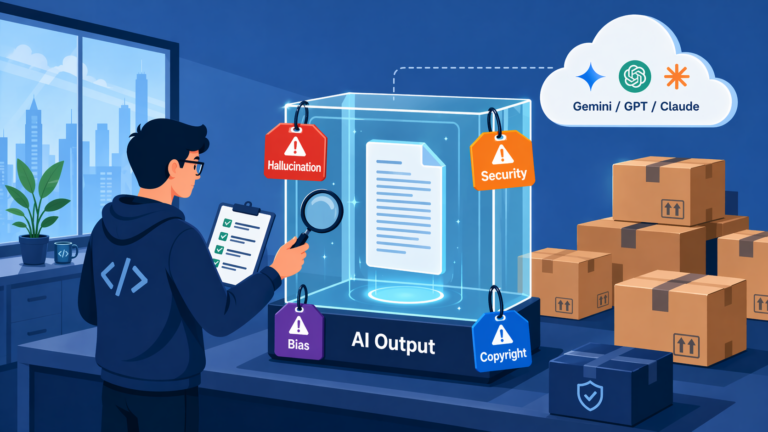
- ‘Mistakes become real’: if the AI runs SQL it hallucinated, the database gets wrecked. An email sent by mistake can’t be recalled.
- ‘Prompt injection’: if a document or web page the AI reads hides an instruction like “use your permissions to delete X,” the AI may follow it.
- ‘The confused deputy problem’: if the AI holds your permissions, malicious input can trick it into misusing them.
- ‘No token passthrough’: don’t simply pass an external service’s auth token through to an MCP server or agent as if it were a proxy (the MCP security docs explicitly classify this as an anti-pattern).
- ‘Permission management’: keep the permissions of the tools you give the AI to a ‘minimum’ (least privilege). For example, allow only read-only DB access and require separate approval for writes.
In practice, teams usually combine safeguards like these.
- Make a human approval step (human-in-the-loop) mandatory for risky actions (deleting files, payments, sending email)
- Keep the list of allowed tools (allowed_tools) narrow when connecting MCP servers/tools
- Log the AI’s tool calls
- Run anything that needs broad permissions, like a coding agent, in a sandbox or VM
- Start with read-only permissions and expand to write permissions later
Wrapping Up: LLMs Are Becoming “AI That Works”
To sum up:
- On its own, an LLM can only use what it knew at training time. Real-time information, your data, and real-world actions all require external connections.
- ‘Function calling’ tells the AI which tools it can use and lets it ask, “Use this tool for me.” Custom functions are executed by your app; built-in tools are executed by the provider’s infrastructure.
- ‘Tools’ is the broader concept that grew out of function calling, covering both built-in and custom tools.
- ‘MCP’ is the standard connection spec between AI and the outside world (tools, data, prompts). It started at Anthropic, moved to the Linux Foundation, and is settling into a vendor-neutral standard.
- ‘A2A’ is the standard for AI agents to discover each other and collaborate. It’s already at the v1.0 production-ready stage, but adoption feels slower than MCP’s.
- Function calling, MCP, A2A, and RAG aren’t on the same layer. Each is a concept at a different level.
- The more powerful the connection, the more security and permission design matter: least privilege, a restricted list of allowed tools, human-in-the-loop, no token passthrough.
AI is no longer a ‘machine that only talks.’ It reads files, calls APIs, runs code, and collaborates with other AIs. To really put these abilities to use, you need one more thing: getting the AI to ‘go find and bring back’ the information it needs on its own.
In the next post, I’ll cover ‘RAG (retrieval-augmented generation),’ an approach where the AI searches a huge pile of documents, picks out only what’s relevant to the question, and uses it to answer.