I Finished the Feature, and Then I Heard “It’s Slow”
I had a CI/CD pipeline in place, a cleaned-up branching strategy, and separate development and production servers. Deployments no longer scared me. Just when I thought I could finally settle down and focus on building features, a problem blew up somewhere I didn’t expect.
“Hey, the list page is really slow. It takes, like, 3 seconds? Is there any way to make it faster?”
That was feedback from the stakeholder. Three seconds. Honestly, it didn’t feel that slow to me. But from the user’s side, clicking the list button and waiting 3 seconds is pretty painful. According to Google research, 53% of users leave when a page takes more than 3 seconds to load.
First, I opened the server logs to find the cause.
[2025-01-15 14:32:01] GET /api/projects - 2847ms
[2025-01-15 14:32:15] GET /api/projects - 3102ms
[2025-01-15 14:32:33] GET /api/projects - 2956ms
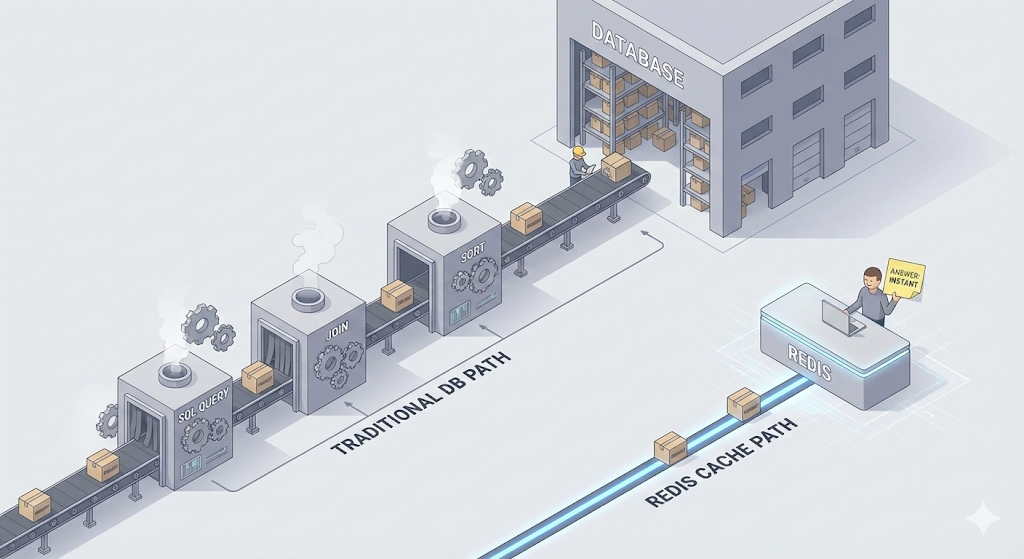
The API response time was close to 3 seconds. When I traced through the code, the cause was obvious. Every time the project list loaded, it queried the entire dataset from the database, JOINed the related tables, and sorted the results on top of that. It was fine when there were a few hundred records, but once the data grew past a few thousand, the query itself had become heavy.
“Wait, does this list data change even once a minute?”
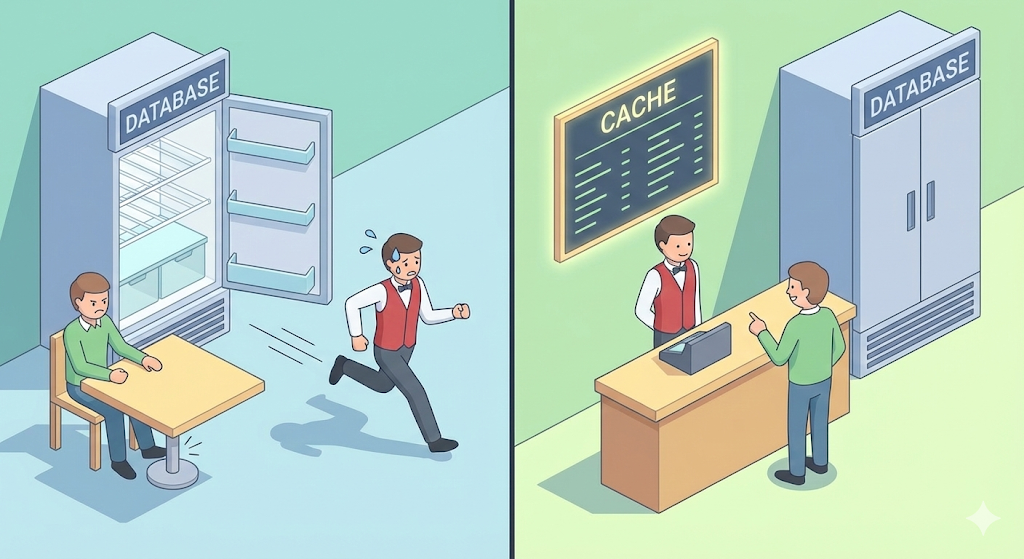
Come to think of it, the project list got maybe one or two new entries a day, if that. Yet every time a user opened the page, we were asking the DB the same question all over again. It was like a restaurant where, every time someone asks “What’s on the menu today?”, the chef goes and opens the fridge to check.
‘Couldn’t we just make a menu board once and stick it on the counter?’
That ‘menu board’ has an official name: a ‘cache’.
What Is a Cache?
A cache is ‘a copy of frequently used data kept close by, ahead of time.’ In the computing world, caches are everywhere.
| Type | Location | Speed | Examples |
|---|---|---|---|
| CPU cache | Inside the CPU | Fastest | L1, L2, L3 caches |
| Browser cache | User’s PC | Fast | Stores image, CSS, and JS files |
| Application cache | Server memory | Fast | Redis, Memcached |
| CDN | Edge servers around the world | Fast | Static file delivery |
What we’re dealing with now is the third one: the ‘application-level cache’. The idea is to slip a ‘fast notepad’ in between the server and the database.
Redis: A Lightning-Fast Notepad in Memory
The go-to tool for that ‘notepad’ role is ‘Redis’.
Redis is a database that stores data in ‘memory (RAM)’ instead of on a hard disk. Think back to what we learned earlier: RAM is tens of thousands of times faster than disk. In terms of our digital logistics center analogy, instead of walking all the way to the permanent storage warehouse (disk/DB), you grab the data from the personal workbench right next to the worker (RAM/Redis).
Regular DB (PostgreSQL, MySQL) lookup: ~10ms Redis lookup: ~0.1ms (about 100 times faster)
Here’s a summary of Redis’s key features.
| Feature | Description |
|---|---|
| In-Memory | Stores data in memory. Ultra-fast, with no disk I/O. |
| Key-Value structure | Simple storage in key: value form. No complex queries needed. |
| TTL (Time To Live) | You can set an expiration time on data. It’s deleted automatically once the time is up. |
| Various data structures | Supports String, List, Set, Hash, Sorted Set, and more. |
Caching Strategies: When to Write It Down, and When to Throw It Away
Adding a cache is easy. The real problem is ‘how you run it.’ Manage it badly, and you end up showing users stale (wrong) data, or with a cache that does nothing at all.
Let’s look at the two most common caching strategies.
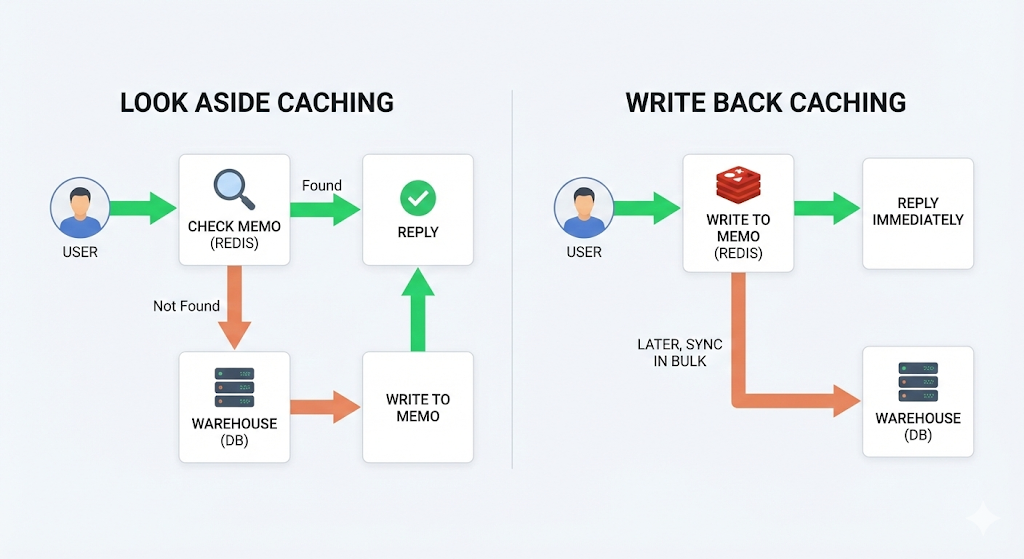
Strategy 1: Look Aside (= Cache Aside), the Most Common One
‘Check the cache first. If the data isn’t there, fetch it from the DB and store it in the cache.’
Here’s how it works.
- A user requests data.
- The server checks whether Redis has that data. (Cache Hit?)
- If it does (Hit) → respond straight from Redis. Done.
- If it doesn’t (Miss) → query the DB → store the result in Redis → respond.
// Look Aside pattern (pseudocode)
public List<Project> getProjects() {
    // 1. Check the cache
    String cacheKey = "projects:list";
    List<Project> cached = redis.get(cacheKey);

    if (cached != null) {
        return cached;  // Cache Hit! No trip to the DB needed
    }

    // 2. Cache Miss → query the DB
    List<Project> projects = projectRepository.findAll();

    // 3. Store the result in the cache (valid for 5 minutes)
    redis.set(cacheKey, projects, Duration.ofMinutes(5));

    return projects;
}
The first user has to go all the way to the DB (Miss), but from the second user on, the data comes straight from Redis (Hit). Even if 100 people open the same page within 5 minutes, the DB query runs exactly once.
| Pros | Cons |
|---|---|
| Simple to implement | The first request is still slow (Cold Start) |
| Ideal when reads vastly outnumber writes | The cache and the DB can get out of sync |
| Even if Redis dies, you can still query the DB directly | TTL settings matter (too long means stale data, too short means no benefit) |
Strategy 2: Write Back (= Write Behind), Optimized for Write Performance
‘Instead of writing data straight to the DB, write it only to the cache first, then apply it to the DB in bulk later.’
Here’s how it works.
- A request to change data comes in.
- The change is saved to Redis only, first. (Response done, fast)
- After a set amount of time, or once a certain amount piles up, the changes are applied to the DB all at once. (Batch Write)
[User] → [Write to Redis] → Immediate response (fast!)
                ↓
         (after a set time)
                ↓
         [Batch apply to DB]
As an analogy, think of the sales records on a convenience store’s POS terminal. The store doesn’t report to headquarters every time it sells something. It collects a full day’s worth and sends it once at night.
| Pros | Cons |
|---|---|
| Very fast write performance | If Redis dies, data not yet applied to the DB can be lost |
| Greatly reduces DB load | High implementation complexity |
| Great for high-volume writes (logs, view counts, etc.) | You have to manage data consistency with the DB |
Putting It into Practice: How I Cut 3 Seconds to 0.003
Now that we know the theory, let’s actually apply it. The strategy that best fit my situation was ‘Look Aside’, because the project list got overwhelmingly more read requests than anything else, and the data rarely changed.
Installing Redis (Done in 3 Seconds with Docker)
I was already using Docker, so Redis takes just one line, too.
# Run the Redis container
docker run -d --name redis \
  -p 6379:6379 \
  --restart always \
  redis:alpine
Connecting Redis to Spring Boot
# application.yml
spring:
  data:
    redis:
      host: localhost
      port: 6379
// Applying the cache: a single @Cacheable annotation is all it takes
@Service
public class ProjectService {

    @Cacheable(value = "projects", key = "'list'")
    public List<Project> getProjects() {
        // This method's result is automatically cached in Redis.
        // From the second call on, the method itself doesn't even run.
        return projectRepository.findAll();
    }

    @CacheEvict(value = "projects", allEntries = true)
    public void createProject(ProjectDto dto) {
        // When a new project is created, invalidate the cache.
        // The next lookup fetches fresh data from the DB and refreshes the cache.
        projectRepository.save(dto.toEntity());
    }
}
| Annotation | Role |
|---|---|
@Cacheable |
Stores the result in the cache. Returns it from the cache on the next call. |
@CacheEvict |
Deletes the cache. Clears out stale cache entries when data changes. |
@CachePut |
Updates the cache. Runs the method and updates the cache with the result. |
The results were dramatic.
[Before] GET /api/projects - 2847ms
[After]  GET /api/projects - 47ms (Cache Miss, first request)
[After]  GET /api/projects - 3ms  (Cache Hit, later requests)
3 seconds → 0.003 seconds. About 1000 times faster.
Practical Advice: The Pitfalls of Caching
A cache is not a ‘silver bullet’. There are pitfalls you need to know about before you adopt one.
1. Cache Invalidation: The Hardest Problem
There are only two hard things in computer science: cache invalidation and naming things. — Phil Karlton
What if the data has changed but the cache still holds the old version? Users will keep seeing a project in the list that has already been deleted. That’s why, whenever data changes, you must delete or refresh the related cache. The @CacheEvict in the code above does exactly that.
2. Setting a TTL (Time to Live)
If you don’t set an expiration time on the cache, data stays there forever once it’s stored. Always set an appropriate TTL.
| Data type | Recommended TTL | Why |
|---|---|---|
| Config values that rarely change | 1 hour to 1 day | Changes infrequently |
| Lists and listings | 5 to 30 minutes | Reasonably fresh |
| User sessions | 30 minutes | Needs to expire automatically for security |
| Real-time data (stock prices, chat) | Not suitable for caching | Needs the latest data every time |
3. When Not to Use a Cache
Putting a cache on every piece of data actually does more harm than good.
- Data where real-time consistency matters (payments, inventory)
- Data that gives a different result every time (personalized recommendations)
- Data that’s read once and never reused
The core principle of caching: ‘Does the same question keep coming up?’ If it doesn’t, a cache is just wasted memory.
4. What If Redis Dies?
Redis is memory-based, so when the server restarts, the data is gone. If you’re using the Look Aside strategy, there’s nothing to worry about. Without Redis, you simply fetch from the DB. But what if you were using Write Back? Any data that hasn’t made it to the DB yet evaporates. That’s why, if you handle important data with Write Back, you must turn on Redis persistence (RDB/AOF).
Wrapping Up: Not ‘Fast’, but ‘Not Needlessly Slow’
Performance optimization sounds like it calls for some grand technology, but in reality it was simple: ‘Don’t recompute data that doesn’t change every single time.’ Just sticking to that one principle took 3 seconds down to 0.003 seconds.
After we introduced Redis, the stakeholder said: “Huh? Why is it suddenly so fast?” “I added a cache.” “A cache? What’s that?” “Think of it as making a menu board.”
But a faster service wasn’t the end of the story. A development server for the stakeholder to review, the actual production server, and now a Redis server too. With more and more servers in the mix, I needed some traffic control to sort out where each request should go.
Next time, we’ll look at the heart of that traffic control: ‘Nginx and reverse proxies’. It’s about putting a ‘gatekeeper’ in front of our service to guide incoming requests to the right place.