Two Very Different Responses to “Build Me a To-Do App”
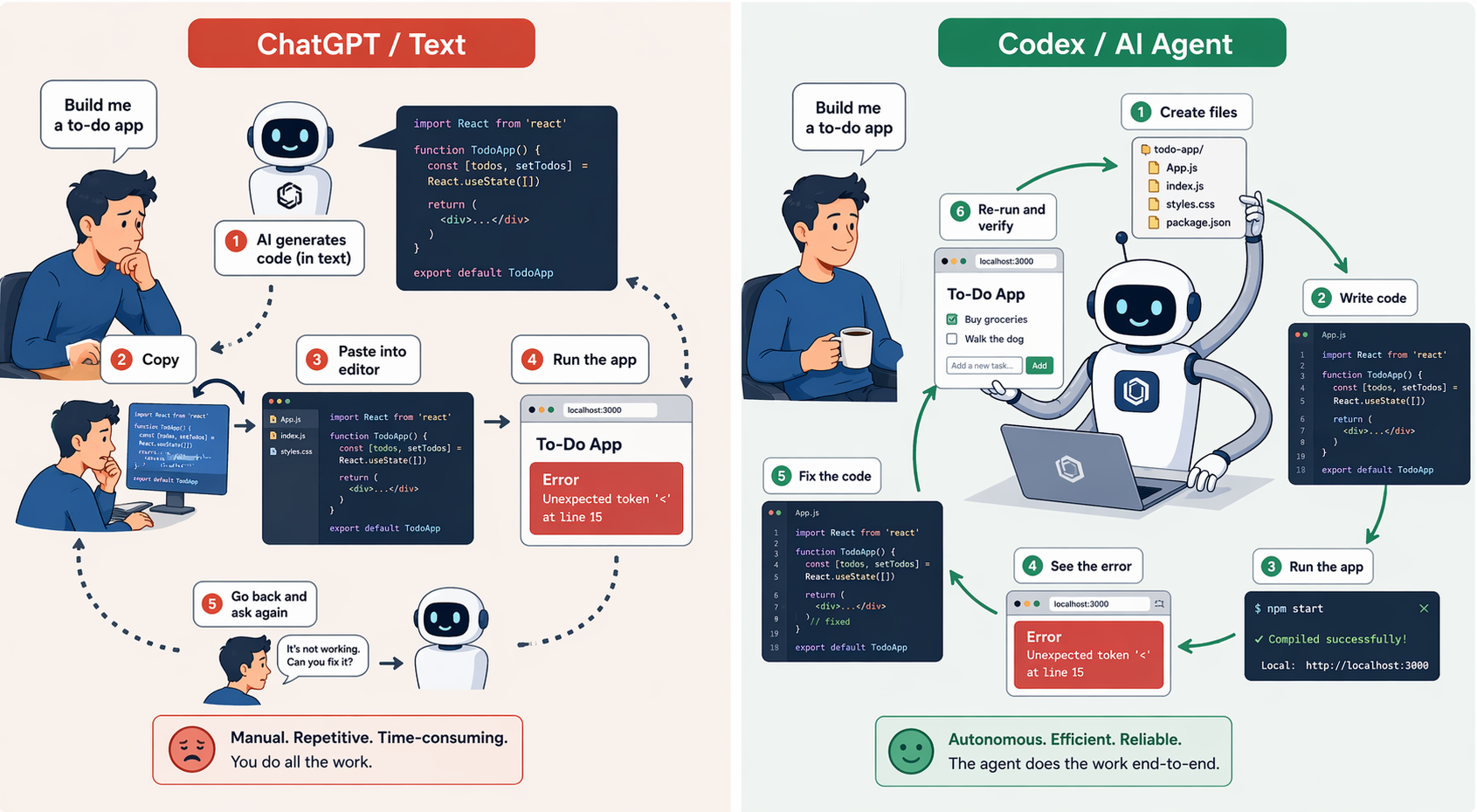
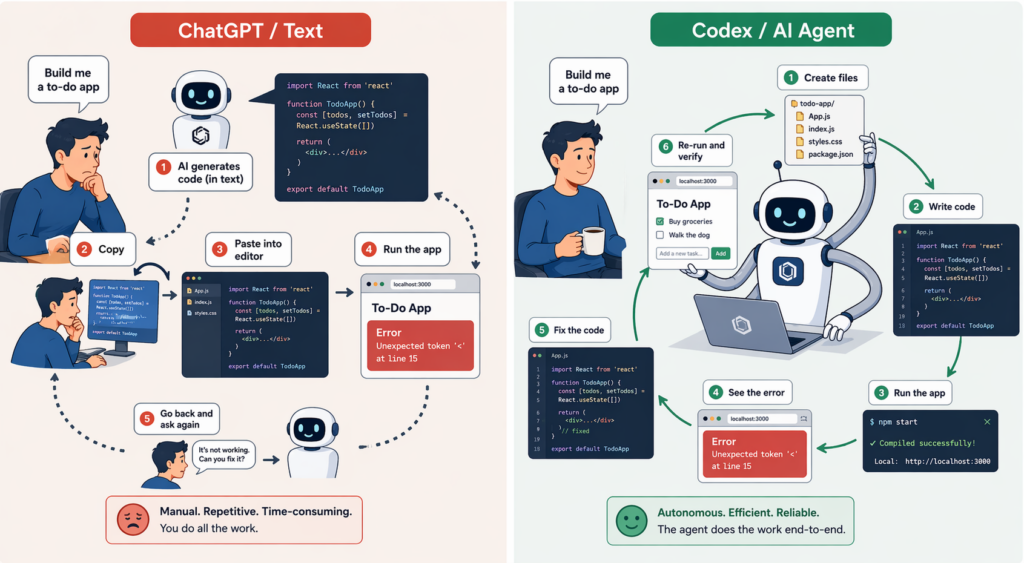
Ask ChatGPT in regular chat mode to “build me a simple to-do app,” and the AI usually prints the code out as text. Copying that code into a project, running it, and asking again when you hit an error is all on you.
In a ‘coding agent mode,’ on the other hand, like Claude Code from Claude or Codex from ChatGPT, the AI reads files, edits code, runs commands, and even goes around the loop of looking at a failure and fixing it again. From a single instruction, it produces a proposed code change, execution results, and even test logs, and you review them and merge them in.
The difference isn’t only that the model is smarter. It’s that ‘tools and an execution loop’ are attached around the model. The chat mode above worked as a ‘text generator’; the latter worked as an ‘AI agent.’
In earlier posts, I covered prompt design, connecting external tools, and RAG. Combine all of them into ‘a structure where the AI decides and acts on its own,’ and you get an agent. In this post, I’ll lay out what exactly an agent is, how it’s built, and when it’s worth using one.
What Is an Agent? A Loop of Decide → Act → Observe
‘TL;DR: An agent is an AI that, “given a goal, plans its own steps, uses tools to carry them out, and looks at the results to decide what to do next.”‘
An agent has three basic ingredients.
| Ingredient | Role |
|---|---|
| Brain (LLM) | Decides what to do next |
| Hands and feet (tools) | Real actions like reading files, running commands, and searching the web |
| Repeating loop | The flow of looking at results and choosing the next action |
It runs through a cycle like this.
1. The user gives a goal: "Build me a to-do app"
2. The LLM decides the next action: "First, let me create a project folder"
3. It acts using a tool: runs the mkdir command
4. It observes the result: "Folder created successfully"
5. It decides the next action: "Now let me create the index.html file"
6. ... repeat until the goal is reached ...
This ‘observe → decide → act’ loop is the heart of an agent. A chatbot answers once and it’s done, but an agent looks at the result and keeps going with the next action.
With just this much, you have an agent that ‘technically runs,’ but to use it in a real service you need three more things: ‘instructions’ (a document that sets the goal and the rules), ‘state management’ (the intermediate results it has to remember while it works), and ‘guardrails’ (permission limits and safety mechanisms). I’ll get to each of these below.
Automation Climbs a Ladder
‘TL;DR: An agent isn’t the “final evolution” of LLM apps. It’s just one rung on the ladder of how much automation you hand to AI.’
Applications that use LLMs differ in ‘how much they hand over to AI.’ The further down the list you go, the more autonomy the AI has, and the higher both the difficulty of building it and the risk climb.
Level 1. Ask the AI once and get an answer (single LLM call)       (simplest)
Level 2. The AI answers while searching data or using tools (RAG/tools)
Level 3. The AI works through multiple steps in a fixed order (Workflow)
Level 4. The AI decides the next step itself as it works (Single-Agent)
Level 5. Multiple AIs split up roles and collaborate (Multi-Agent)    (most complex)
In many cases, levels 1 and 2 are enough. The shared advice in industry guides (Anthropic, OpenAI) is ‘start simple, and climb only when you really have to.’ That doesn’t mean agents are newer and therefore better. If one answer does the job, a single call is better; if there’s a fixed sequence, a workflow is better; you need an agent only when the next action is hard to decide in advance.
Workflow vs Agent: They Look Alike, but They Aren’t
‘TL;DR: A workflow “runs in a predefined order”; an agent “has the AI decide what to do next, every time.” The difference is how much you hand over to AI.’
As the word ‘agent’ has become a buzzword, structures that look similar but are actually different sometimes get called by the same name. The most important distinction is the one between a ‘workflow’ and an ‘agent.’
Workflow: The Developer Sets the Flow in Advance
[Step 1] Receive the user question
[Step 2] Classify it into a category with the LLM
[Step 3] Call a different function depending on the category
[Step 4] Summarize the result with the LLM
[Step 5] Deliver the answer to the user
The steps are fixed. Even if an LLM is used inside each step, ‘what happens next’ is decided in advance by the developer, in code. It’s predictable and easy to debug.
Agent: The AI Decides What to Do Next
[Goal] "Fix this bug"
→ AI: "I should look at the error log first" → reads the log
→ AI: "This file looks like the cause" → opens the file
→ AI: "This line needs to change" → edits the code
→ AI: "Let me run the tests" → runs them
→ AI: "Failed again, I need to look at other parts too" → repeats
The AI decides each step. It’s flexible but unpredictable, and when bad decisions pile up, it wanders off in the wrong direction.
| Aspect | Workflow | Agent |
|---|---|---|
| Control | The developer designs the flow | The LLM decides the next step |
| Predictability | High | Low |
| Autonomy | Low | High |
| Debugging | Easy | Hard |
| Cost | Relatively low | Relatively high (repeated calls) |
| Best suited for | Standardized, repetitive tasks | Open-ended tasks whose approach isn’t fixed in advance |
Workflows can be quite flexible too, with patterns like branching, parallel processing, and evaluate-and-improve loops. To be precise, rather than ‘less flexible,’ the better description is ‘less autonomy handed to the AI, and in exchange, more predictable results.’
The shared advice in industry guides as of 2026: ‘The default in practice isn’t “let’s start by building an agent” but raising complexity in the order “single LLM call → workflow → agent.”‘ Agents look cooler, but their cost and unpredictability are high. The realistic approach is to use them only for tasks that genuinely need the AI’s own judgment.
The Basic Form of an Agent: Start with a Single Agent
‘TL;DR: The basic setup is one agent using tools to reach a goal. Build this well before you start wiring multiple agents together.’
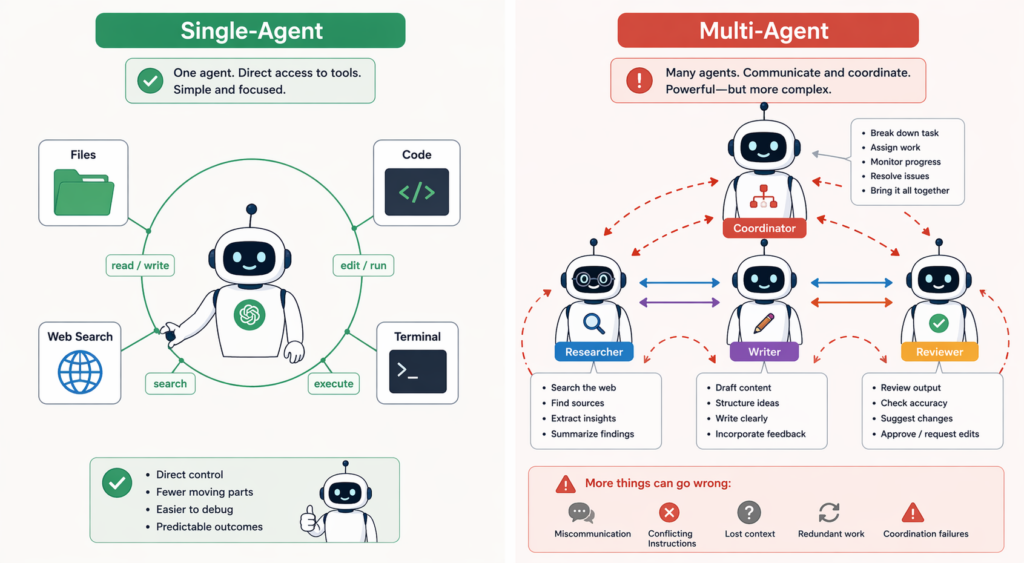
The simplest agent structure is the ‘Single-Agent.’ One agent uses several tools to reach a goal.
[User goal]
     ↓
┌──────────────────────────┐
│   Single Agent (LLM)     │
│     ↑           ↓        │
│  Results     Actions     │
│     ↑           ↓        │
│  ┌────────────────────┐  │
│  │  Toolbox:          │  │
│  │  - Read files      │  │
│  │  - Write files     │  │
│  │  - Run code        │  │
│  │  - Search the web  │  │
│  └────────────────────┘  │
└──────────────────────────┘
     ↓
[Final result]
For coding tools like Claude Code, Cursor, Codex, and Antigravity, the basic unit of work is usually this kind of ‘loop where a single agent keeps using file, terminal, and search tools.’ That said, the latest products also layer product-level multi-agent features on top, like parallel worktrees, cloud agents, and running several models at once. The core unit of operation is the single agent, with product features stacked on top of it.
The strength of a single agent is simplicity. It’s easy to debug, its cost is predictable, and its flow is easy to follow. Rather than splitting the work across several agents from the start, giving one agent good tools and clear instructions is usually simpler and more stable. Anthropic and OpenAI both point the same way in their official guides.
Multi-Agent: Only When You Really Need It
‘TL;DR: A structure where multiple AI agents split up roles and collaborate. It looks impressive, but use it only when a single agent can’t get the job done.’
As tasks get more complex, you start to wonder, “Wouldn’t it be better if several agents worked together?” That’s the ‘Multi-Agent’ structure.
[User goal]
     ↓
[Coordinator Agent (conductor)]
     ↓
┌────────┬────────┬────────┐
│        │        │        │
[Research] [Writer] [Reviewer]
  agent    agent    agent
  ↓        ↓        ↓
(each with its own tool set)
Example: “Plan a 3-night, 4-day trip to Tokyo”
- Coordinator: coordinates the overall trip plan
- Research Agent: searches for flights, hotels, and attractions
- Writer Agent: writes the itinerary
- Reviewer Agent: reviews the plan and checks for conflicts
It’s clean in theory, but in reality complexity grows exponentially. Problems like communication failures between agents, overlapping roles, endless waiting, and exploding costs show up fast.
That’s why the industry guides send a consistent message: ‘Use Multi-Agent only when a single agent can’t solve the problem.’ They recommend it only when several areas of expertise are clearly separated, the gains from parallel processing are large, and each agent’s role is sufficiently independent.
In practice, the safe approach is not to design a multi-agent system from day one, but to start with a single agent and split off only the parts that need it once its limits become clear.
When Should You Use an Agent?
‘TL;DR: Agents fit tasks where “the steps aren’t fixed in advance,” “you have to make calls based on intermediate results,” and “repeated attempts are needed.”‘
Agents aren’t a cure-all. Use this checklist to decide.
| Question | If yes, an agent fits |
|---|---|
| Is it impossible to fix the steps in advance? | Yes (coding, research, etc.) |
| Does the direction change depending on intermediate results? | Yes (fixing errors, etc.) |
| Is there room to retry if it fails? | Yes |
| Can the results be verified? (tests, linters, etc.) | Yes (recommended) |
Conversely, for tasks where ‘the same answer has to come out every time, and predictable time and cost matter,’ a workflow is a better fit than an agent.
Where Agents Shine
- ‘Coding’: a great match for the loop of fixing things while watching the errors (the reason tools like Claude Code and Cursor have succeeded)
- ‘Deep research’: searching multiple sources and assembling an answer
- ‘Browser automation’: looking at web pages and repeatedly clicking and typing
- ‘Data analysis’: running a query, checking the results, designing the next query
Where Agents Are a Poor Fit
- ‘Simple FAQ/policy chatbots’: a workflow/RAG is safer (though customer support that needs actions like ‘looking up orders, deciding on refunds, creating tickets’ may actually be a good fit for an agent, provided permissions, approvals, and audit logs are in place)
- ‘Work with fixed decision branches’: a workflow is safer
- ‘Real-time, low-latency services’: agents can be slow because of their repeated calls
- ‘Heavily regulated fields’: unpredictability is a risk
Problems You Run Into in Practice
‘TL;DR: Infinite loops, runaway costs, error propagation, and the difficulty of evaluation are the four big traps of agents.’
1. Infinite Loops
An agent can repeat the same action over and over, or keep digging in the wrong direction. “Fix this code” → fixed → a different error → fixed → yet another error… Eventually you get cases that still aren’t solved after 50 iterations.
Basic defenses:
- Cap the ‘maximum number of iterations’ (e.g., 10 to 20)
- ‘No-progress detection’ (stop when the same error keeps repeating)
- Set ‘human intervention points’ (ask the user after N attempts)
2. Runaway Costs
Within a single user request, an agent makes LLM calls and tool calls again and again. That means cost and latency can grow far beyond a single chatbot call. Costs climb especially fast when there’s no loop limit, or when searches, code execution, and large-model calls keep repeating. Design it badly, and a single user’s request could run up a bill far beyond anything you expected.
Defenses:
- Set token caps per user and per request
- Route simple tasks to small models and only complex decisions to large models
- Cache intermediate results
3. Error Propagation
If an agent sets up a wrong premise early on, it keeps stacking work on top of it. If you only notice late, it’s hard to undo.
Defenses:
- Have the user confirm at intermediate checkpoints
- Make human-in-the-loop mandatory for risky actions (deleting files, changing the DB, etc.)
- Make everything traceable through execution logs
4. Evaluation Is Hard
How do you measure the quality of an agent system? It’s more complicated than “Is the answer right?” You have to look at everything: the intermediate decisions, whether the tools were used appropriately, and the final result.
This evaluation problem is the topic of the next post, so I’ll just flag it here and move on.
Autonomy Isn’t 0 or 1: Designing Permission Levels
‘TL;DR: Agents aren’t a choice between “fully automatic” and “manual.” Designing a different level of autonomy for each task is the key to production.’
“Agent = dangerous full automation” is a common misconception. In reality, you can let some tools run automatically, make others run only after approval, and have certain tasks handed off to a person. The key to a production agent is designing ‘how much to delegate’ more than ‘how smart it is.’
An example of how to split permission levels:
| Level | Examples | Need for approval |
|---|---|---|
| Read | Reading files, querying the DB, web search | Low (can be automatic) |
| Write | Editing files, creating tickets, opening PRs | Medium (approval recommended) |
| External send | Sending email, posting to Slack, notifications | High (approval required) |
| Destructive actions | Deleting files, payments, DB changes | Very high (multi-step confirmation) |
The official guides from both OpenAI and Anthropic describe the core of ‘guardrails (safety mechanisms)’ as a combination of ‘permission limits, input validation, restrictions on tool use, and a step where a human steps in partway through (human-in-the-loop).’
📦 Extra Notes for Developers
General readers can skip everything from here on. What follows is supplementary material for developers who want to build agents themselves.
‘Frameworks’: LangChain, LangGraph, LlamaIndex, the OpenAI Agents SDK, Anthropic’s claude-agent-sdk, and more. If you’re just starting out, beginning with the provider’s own SDK gives you a gentler learning curve.
‘State management’: as an agent conversation gets longer, the context fills up fast. You need a strategy for summarizing intermediate results or saving them to long-term memory. You can also use features that record intermediate state, like ‘checkpointing’ (saving work points) in the Claude Agent SDK.
‘Tool design’: a large part of an agent’s performance comes down to how well the tool descriptions are written. Design tool names and parameter descriptions as carefully as you would a prompt.
‘Observability’: you need to be able to trace ‘what reasoning led the agent to call which tool’ before you can debug it or analyze its costs. Many SDKs integrate with standard tracing tools like OpenTelemetry.
‘Harness (the full working-environment setup)’: for coding agents, the ‘working environment’ matters as much as the prompt. The better prepared your tests, linters, type checkers, docs, code conventions, PR templates, and work logs are, the more the agent can fix and verify things on its own. This whole environment is called a ‘harness.’ It’s a concept that the OpenAI Codex team, Martin Fowler, and others have been emphasizing recently. I’ll pick it up in the next post.
‘AGENTS.md’: a README-like file for coding agents. It records install commands, test commands, code style, and security caveats. Separate from the README written for humans, it’s a manual that tells the agent ‘how to work here.’ It’s spreading quickly across open-source projects.
Wrapping Up: An Agent Is Not the Goal
To sum up:
- Agent = LLM + tools + a repeating loop + instructions + state + guardrails. It reaches its goal by repeating ‘observe → decide → act.’
- LLM apps sit on a ladder of complexity: ‘single call → RAG/tools → workflow → single agent → multi-agent.’ An agent isn’t the final evolution; it’s one of several complexity options.
- In a workflow, “the developer sets the flow”; in an agent, “the LLM decides the next step.” Whenever possible, start with the simpler one.
- A single agent is the default; go multi-agent only when a single agent can’t do the job.
- Autonomy isn’t 0 or 1. Designing permission levels per task (read/write/external send/destructive) is the key to production.
- Traps in practice: infinite loops, runaway costs, error propagation, and the difficulty of evaluation. All four need defenses.
“Agent” is a cool keyword, but it shouldn’t become ‘the goal.’ Good practical judgment means first asking, ‘Do I need an agent for this problem, or will a plain workflow do?’
In the next post, I’ll cover ‘how to make’ these agents ‘run well’: evals, guardrails, traces, and the ‘harness’ that has been getting a lot of attention in the coding agent world lately. These are what it takes to move an agent from experiment to production.