“Just Put Some AI in It, Anything Will Do”
Ever since the AI craze swept over the world, there’s one line developers hear a lot.
“Shouldn’t we put some AI into our product too?”
“What should we put in?”
“That’s up to you. Anyway, we need something AI-related.”
Automatic email classification, document summaries, an internal chatbot, whatever it is, you have to attach ‘something AI-ish.’ The developer opens the company’s Spring Boot project and quietly starts googling. The first approach that comes to mind is this:
“Can’t I just call the OpenAI API over HTTP?”
Right. It does work. It works for the first feature or two. But around the time you add the third, things like this start to show up: managing prompt templates, parsing response JSON, retries and timeouts, logging token usage, smoothing over differences between models, handling streaming, connecting a vector DB for RAG… At some point the AI boilerplate has grown bigger than the actual business logic.
In this post, I’ll walk through how Spring developers can add AI features cleanly, centered on the ‘Spring AI’ framework. It’s a look at what the concepts from earlier posts (prompts, structured output, RAG, tool calling, observability) look like once they’re implemented in the Spring ecosystem.
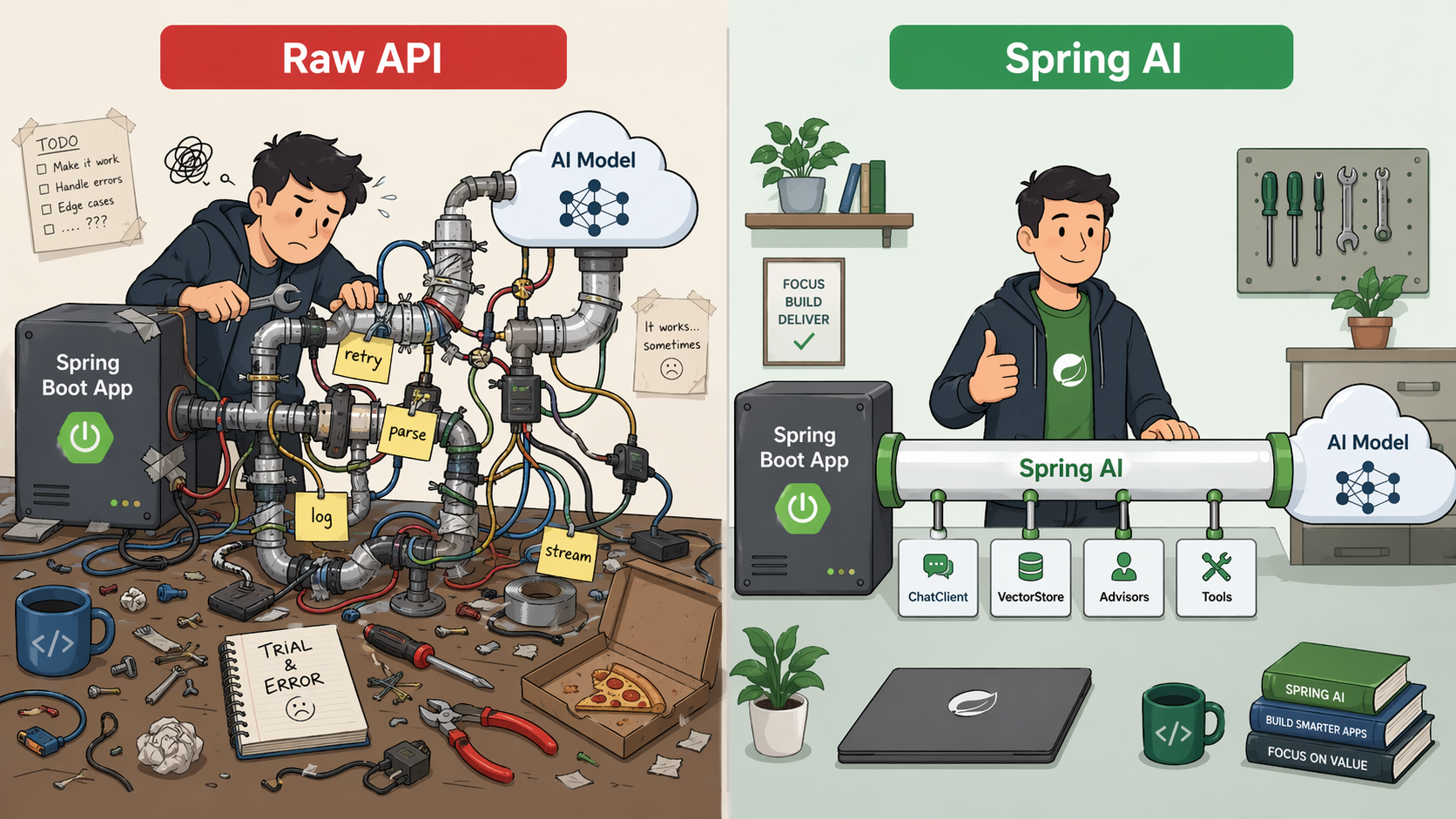
What Is Spring AI?
‘One-line summary: an official project that abstracts LLM calls and the features around them, the same way Spring abstracted JDBC, JPA, and Security.’
Spring AI is Spring’s official framework for AI applications. With 1.0 GA in May 2025 and 1.1 GA in November 2025, its MCP, prompt caching, model provider, and observability features expanded significantly. As of April 2026, 1.1.x is the stable version for the Spring Boot 3.5.x line, and 2.x is the preview line heading toward Spring Boot 4.x. The goal is ‘an integration layer where common features are provider-independent and advanced features accept differences between providers.’
It’s worth being upfront about this. With Spring AI, ‘common features are abstracted well, but provider differences show through as-is in advanced features like reasoning/thinking, native structured output, prompt caching, and the scope of MCP support.’ This post looks at both the strengths and the limits.
Here are its core strengths:
| Area | What it provides |
|---|---|
| Model providers | Adapters for OpenAI, Anthropic, Google (Gemini), Azure OpenAI, Ollama, Bedrock, and more |
| Chat abstraction | ChatClient, ChatModel (Chat Completion style) |
| Structured output | Maps directly to Java classes/records |
| RAG support | VectorStore, DocumentReader, ETL pipeline |
| Tool calling | @Tool annotation, MCP client/server |
| Observability | Micrometer integration (metrics, traces) |
| Retries/timeouts | Spring Retry integration |
In short, it provides Spring-style abstractions for most of the concepts covered in earlier posts.
Getting Started: Adding the Dependencies
‘One-line summary: pin versions with the BOM, add only the provider starters you need, and you’re done.’
// build.gradle (Spring Boot 3.5.x + Java 17+ recommended)
dependencies {
implementation platform("org.springframework.ai:spring-ai-bom:1.1.4")
implementation "org.springframework.ai:spring-ai-starter-model-openai"
// or whichever provider you need: Anthropic, Gemini, Ollama, etc.
}
# application.yml
spring:
  ai:
    openai:
      api-key: ${OPENAI_API_KEY}
      chat:
        options:
          model: gpt-4o-mini  # Example only. For production, check current pricing/performance/support status
          temperature: 0.7
Adjust the version to the stable Spring AI release at the time you’re reading this. Spring AI 1.1.x targets the Spring Boot 3.5.x line, and 2.x targets Spring Boot 4.x. If your company is on Boot 2.x + Java 8, upgrading comes first.
First Call: ChatClient
‘One-line summary: one line of ChatClient lets you talk to the AI, and you can even specify the response type.’
The most basic entry point in Spring AI is ChatClient. You use it with a builder pattern, much like an HTTP client.
@Service
public class AskService {

    private final ChatClient chat;

    public AskService(ChatClient.Builder builder) {
        this.chat = builder.build();
    }

    public String ask(String question) {
        return chat.prompt()
            .user(question)
            .call()
            .content();
    }
}
Attaching a system prompt (top-level instructions) is easy too.
public String ask(String question) {
    return chat.prompt()
        .system("You are a Spring Boot expert. You answer in Korean.")
        .user(question)
        .call()
        .content();
}
At first, the simplest route is to start with non-streaming calls in the .call().content() style. If you need to stream results to the UI token by token, you can get a Flux<String> with .stream().content(). It pairs well with WebFlux.
‘Be careful when mixing streaming + tool calling + advisors.’ Spring AI has spots where the imperative and reactive models meet. If you use this combination, be sure to check ‘the call boundaries (where it’s reactive and where it’s blocking) and whether observability spans connect properly.’ With the default settings, there are cases where spans get cut off or the non-streaming path runs as blocking.
Structured Output: Getting Java Records Back Directly
‘One-line summary: you can map AI answers directly to Java class/record types. In most cases, you can get started without handling JSON Schema yourself.’
In an earlier post (prompt and context design), I talked about ‘getting answers in a fixed format (Structured Output).’ Spring AI connects this directly to Java types.
public record ProjectSummary(
    String title,
    String priority,   // HIGH / NORMAL / LOW
    List<String> tags
) {}

public ProjectSummary summarize(String content) {
    return chat.prompt()
        .user("Please summarize the following project description:\n" + content)
        .call()
        .entity(ProjectSummary.class);   // ← the key part
}
Spring AI builds format instructions or a JSON Schema from the Java type and converts the model’s response into a Java object. Return it straight from a controller, and that becomes your API response.
There’s a caveat, though. The default StructuredOutputConverter approach is best effort, so ‘schema compliance isn’t always guaranteed.’ If the provider supports native structured output, turning it on makes things more stable. Either way, ‘format stability’ goes up a lot, but ‘value accuracy’ isn’t guaranteed. In production code, put validation and a fallback alongside it.
RAG: Connecting Through VectorStore
‘One-line summary: you can use a variety of vector stores, like PGVector, Redis, and Elasticsearch, through the same interface.’
Spring AI abstracts the retrieve-and-inject pipeline covered in an earlier post (intro to RAG). The core interfaces are VectorStore, EmbeddingModel, and Advisor.
Configuring the Vector Store
implementation 'org.springframework.ai:spring-ai-starter-vector-store-pgvector'
spring:
  ai:
    vectorstore:
      pgvector:
        schema-name: public
        table-name: vector_store
        dimensions: 1536  # Must match the output dimension of the EmbeddingModel you use
dimensionsisn’t a vector DB setting; it’s ‘the output dimension of the embedding model you’re currently using.’ 1536 is an example of the default dimension of OpenAI text-embedding-3-small; Gemini, Cohere, BGE, Bedrock Titan, and others differ. ‘Only specify it when you’ve created the table schema yourself or are using a fixed model.’ PgVectorStore can pick up the dimension automatically from theEmbeddingModel, and if the value you hardcode here differs from the model’s actual output dimension, the whole index breaks. That’s also why switching models can leave the dimension out of sync with your existing index and may require reindexing.
Loading Documents (ETL)
@Service
public class DocumentIngestionService {

    private final VectorStore vectorStore;

    public DocumentIngestionService(VectorStore vectorStore) {
        this.vectorStore = vectorStore;
    }

    public void ingest(Resource pdfResource) {
        List<Document> docs = new PagePdfDocumentReader(pdfResource).read();
        List<Document> chunks = new TokenTextSplitter().apply(docs);
        vectorStore.add(chunks);
    }
}
For a demo-level PDF, you can get started quickly with a Reader → Splitter → VectorStore flow. In production RAG, though, PDF parsing quality, OCR, table handling, chunking strategy, metadata, and the reindexing pipeline largely determine quality (see the intro to RAG post).
Querying: Adding RAG with an Advisor
In Spring AI, an ‘Advisor’ is middleware that steps in before and after a ChatClient call. Attach a QuestionAnswerAdvisor, and your RAG pipeline is complete.
@Service
public class RagService {

    private final ChatClient chat;

    public RagService(ChatClient.Builder builder, VectorStore vectorStore) {
        this.chat = builder
            .defaultAdvisors(
                QuestionAnswerAdvisor.builder(vectorStore)
                    .searchRequest(SearchRequest.builder()
                        .similarityThreshold(0.8)
                        .topK(6)
                        .build())
                    .build()
            )
            .build();
    }

    public String ask(String question) {
        return chat.prompt()
            .user(question)
            .call()
            .content();
    }
}
The Advisor takes the question, searches the VectorStore for relevant documents, and automatically injects the results into the prompt. For more complex RAG, you can consider a modular setup like RetrievalAugmentationAdvisor.
‘In internal RAG, permissions have to be part of the search too.’ Metadata filters like
tenantId,department,securityLevel, anddocumentStatusare a must. Documents a user isn’t allowed to see must not show up in VectorStore search results either. With Spring AI’sSearchRequestfilter expressions, you can limit the search scope per Advisor or per request.
Tool Calling: The @Tool Annotation
‘One-line summary: just put @Tool on a Java method, and it becomes a tool the AI can call.’
Here’s how Spring AI abstracts the Function Calling covered in an earlier post (connecting to the outside world).
@Service
public class WeatherTools {

    @Tool(description = "Gets the current weather for a given city")
    public String getWeather(
        @ToolParam(description = "City name") String city
    ) {
        // Call the real weather API
        return weatherApi.fetch(city);
    }
}
To hand this tool to the AI, include it in the ChatClient call.
public String ask(String question, WeatherTools tools) {
    return chat.prompt()
        .user(question)
        .tools(tools)
        .call()
        .content();
}
When a user asks, “What’s the weather in Seoul today?”, Spring AI passes the @Tool method’s signature and description to the model. When the model requests a getWeather("Seoul") call, Spring AI runs the actual method and feeds the result back to the model to complete the final answer. The framework wraps the whole loop for you: ‘pass the tool schema → the model requests a tool call → run the actual method → re-inject the result.’
‘@Tool is convenient but dangerous.’ You’re handing the model “a list of methods it can call,” so you must not expose read tools and write tools at the same level. Even if lookup tools run automatically, tools for sending email, payments, DB updates, and file deletion need a separate approval flow. Registering common tools with
defaultTools()is convenient, but it makes them callable on every request, so a design that passes only the tools needed per request with.tools(...), based on user permissions and the workflow, is safer.
MCP: A Major Expansion in Spring AI 1.1
Spring AI supports MCP connections too. With the spring-ai-starter-mcp-client starter, you can pull tools from external MCP servers into ChatClient, and conversely, with spring-ai-starter-mcp-server, you can expose your own app as an MCP server. Spring AI 1.1 provides STDIO/SSE/Streamable HTTP transports and an annotation model with @McpTool, @McpResource, and @McpPrompt.
That said, remote MCP in production needs ‘design,’ not just ‘a connection.’ You have to get authentication, authorization, a tool allowlist, timeouts, audit logs, and sensitive data masking right together. MCP Security in particular is evolving quickly, so checking the docs for each version is a must. Token passthrough (handing an external service’s token as-is to the MCP server) is an anti-pattern that the MCP security documentation explicitly forbids.
Observability: Automatic with Micrometer
‘One-line summary: basic metrics like call duration and token usage are collected automatically. However, prompt/response bodies aren’t logged by default because they may contain sensitive information.’
The ‘execution records (traces)’ and ‘cost/performance tracking’ I emphasized in an earlier post (evaluation and harness) connect through Actuator/Micrometer in Spring AI. It’s an approach Spring developers already know well.
management:
  endpoints:
    web:
      exposure:
        include: prometheus, metrics
  metrics:
    tags:
      application: ${spring.application.name}
Call durations and token usage for ChatClient, ChatModel, Advisor, VectorStore, and more are exposed as metrics and traces based on the OpenTelemetry/Micrometer semantic conventions. They flow straight into your existing APM infrastructure (Prometheus/Grafana, Tempo, Jaeger, Datadog, etc.).
‘Note: prompt and response bodies aren’t exported by default.’ Spring AI turns this off deliberately because personal information and internal data can get mixed in. When you turn on body logging for debugging, you need to design ‘masking, access permissions, retention periods, and sampling policies’ along with it (see the evaluation and harness post).
Cost: Spring AI Won’t Solve It for You
‘One-line summary: the more convenient the framework, the easier it is for calls and tokens to pile up. Spring AI makes costs “visible”; it doesn’t “reduce” them.’
Spring AI simplifies LLM calls. But that convenience can turn into a trap. Being able to add RAG, tool calling, retries, and MCP so easily also means that, with a poor design, the number of calls and tokens in a single request can grow exponentially.
The main places where costs grow:
| Where | Description | Defense |
|---|---|---|
| LLM calls | Every ChatClient call = API cost | Model routing, max tokens, a per-request budget cap |
| Retry | Retries on failure/timeout increase the number of calls | Tune the retry count, design for idempotency |
| RAG | Embedding, retrieval, injecting long context | Limit topK, tune chunks, cache results |
| Tool calling | LLM↔tool loops can repeat within a single request | Tool allowlist, iteration limits |
| Observability | Storing prompts/responses adds storage cost + security risk | Sampling, masking, retention periods |
Spring AI’s retry settings apply across all providers under the common spring.ai.retry.* prefix (they’re not OpenAI-specific). The defaults are max attempts 10, initial interval 2 seconds, multiplier 5, and max interval 3 minutes. That helps stability, but if a request the server already processed gets retried after a timeout, you end up with cost and duplicate-execution problems. OpenAI’s n (number of candidates to generate) option also directly affects token cost, so it’s safer to keep it at the default of 1.
On the flip side, Spring AI also has features that make costs ‘easier to cut.’ Spring AI 1.1 supports ‘prompt caching’ for Anthropic Claude and AWS Bedrock. For agent and RAG apps with repeated system prompts or long tool definitions, it can cut costs significantly. In production, you must have ‘per-request max tokens, a per-request budget, retry limits, limits on the number of tool calls, and RAG topK limits.’
Practical Tips
1. Lower the Cost of Switching Providers (but Don’t Expect a “Swap with No Changes”)
Using spring-ai-starter-model-openai doesn’t tie your code to OpenAI. You can switch providers to Anthropic, Gemini, or Ollama with the same ChatClient interface. A strategy of cheap models for early development, high-performance models for production, and Ollama for local testing is easy to pull off.
However, ‘Spring AI doesn’t completely erase the differences between providers.’ Simple chat, embeddings, and basic tool calling are abstracted relatively well. But ‘reasoning/thinking options, native structured output, prompt caching, citations, grounding, the scope of MCP support, and safety policies’ differ from provider to provider. Start with the common API, but in production it’s safer to have a thin adapter layer that wraps the provider-specific options.
2. Think About Cost/Speed Routing Early
Spring AI’s ChatClient.Builder lets you register multiple models split by profile or purpose. If you set up a structure from the start that routes simple classification to small models and complex judgment calls to big models, managing cost gets easier.
3. Keep Prompts in Separate Resource Files
Don’t hardcode prompts as inline strings; separate them into src/main/resources/prompts/*.st files. Spring AI’s PromptTemplate handles variable binding in StringTemplate style. When changing a prompt becomes a resource change instead of a code change, A/B testing and deploying them separately get easier.
4. For Enterprise Environments: Azure/Bedrock/Google GenAI
If the public OpenAI API is off-limits in your environment, you can look at enterprise routes like Azure OpenAI, AWS Bedrock, and Google GenAI/Vertex AI mode. However, cloud-specific adapters and model integrations change a lot from version to version. In Spring AI 2.0.0-M4, for example, the existing Vertex AI classes were deprecated and folded into Google GenAI. Check the latest docs for both Spring AI and your cloud provider.
5. Don’t Overuse @Tool
If you slap @Tool on lots of methods because it’s convenient, the tool descriptions handed to the AI get longer, which means more tokens and more confusion in its decisions. I recommend exposing only the tools you truly need and designing per-user limits on which tools are allowed.
When Spring AI Isn’t a Good Fit
Spring AI isn’t always the answer. In the following cases, a different choice is more natural.
| Situation | Better choice |
|---|---|
| A small script that calls the OpenAI API just once | raw SDK (OpenAI Python/Node SDK, etc.) |
| A team tightly tied to Python-based data/ML pipelines | LangChain, LlamaIndex, provider SDKs |
| You need a provider’s newest features right after release | Use the provider SDK directly (until Spring AI’s abstraction catches up) |
| Spring Boot 2.x / Java 8 legacy | Upgrade first. Or implement it with raw HTTP |
Spring AI fits best for ‘teams that need to put AI features inside a Spring Boot service and run them reliably.’ If your existing operations stack centers on Actuator/Micrometer/Prometheus/OpenTelemetry/Spring Security/Spring Data, starting with Spring AI is more sensible than writing everything with raw HTTP.
The Big Picture: Where the AI Decoded Series Concepts Live in Spring AI
Here’s how the concepts from earlier posts map to the parts of Spring AI.
| Concept | Spring AI equivalent |
|---|---|
| Prompts/system messages | ChatClient.prompt().system()/.user() |
| Structured output | .entity(MyRecord.class) |
| Tool calling | @Tool annotation |
| MCP | spring-ai-starter-mcp-client / -server |
| RAG | VectorStore + QuestionAnswerAdvisor |
| Agent loop | Advisor chain, repeated Tool calls |
| Evaluation/observability | Micrometer metrics, OpenTelemetry traces |
If you’re already comfortable with the Spring ecosystem, it’s fair to think of it as ‘a tool that lets you use AI the way you already know.’
Wrapping Up: AI Ends Up Coming Through “That Framework” Too
To sum up:
- Spring AI is Spring’s official AI integration layer. It provides consistent abstractions for model providers, chat, structured output, RAG, tool calling, MCP, and observability.
- The entry point is ChatClient. You call it with a builder pattern and can get type-safe responses with
.entity(Class)(not always guaranteed, so validation is needed). - Add RAG with VectorStore + Advisor, and tool calling with the @Tool annotation. Internal RAG needs metadata filters so that permissions are reflected in the search itself.
- It integrates with Micrometer/OpenTelemetry, so basic metrics and traces come automatically. However, prompt/response bodies aren’t exposed by default, for security reasons.
- For common features, switching providers is cheap, but advanced features like reasoning, caching, structured output, and MCP differ by provider. Don’t expect a ‘swap with no changes.’
- Spring AI doesn’t make costs go away. Make per-request max tokens, retry limits, tool loop limits, and RAG topK limits your production defaults.
Spring is doing for AI exactly what it did in the past with JDBC, JPA, Security, and Boot. Rather than writing everything with raw HTTP from the start, it’s more realistic to start with Spring AI and drop down to your own implementation only when you need to.
The next post covers running AI not through a public API but ‘inside my own computer.’ It’s about what to consider when running local LLMs with tools like Ollama and vLLM, plus quantization and GPU/cost. It’s a useful topic for environments where internal data must not leave the company, and for individual developers who want to experiment without worrying about fees.